
Features /
AI process creation
AI process mapping that starts from a sentence
AI process mapping software turns a plain-language description of work into a draft process diagram. In Gluu, the Assistant suggests the roles and activities involved, lays them out as swimlanes, and hands you a private draft to edit — so mapping starts from a first version instead of an empty canvas.
 Microsoft Preferred Solution
ISO 27001 compliant
What it is
AI process creation is the guided wizard that turns a short description of how work is done into a draft BPMN 2.0 diagram: roles as swimlanes, activities in sequence, ready to edit. Instead of drawing every box by hand, you review what the Assistant proposes and keep what fits. It is one part of Gluu’s wider capabilities for mapping and running processes, alongside mapping a process by hand when you would rather sketch it yourself.
Why it matters
From blank canvas to first draft in minutes

Beat the blank page
The hardest part of mapping is starting. AI removes it — you edit a draft instead of inventing structure.

Standards by default
The draft is a BPMN 2.0 diagram from the start, so the same file carries on into the full editor when you need gateways, events and audit-ready precision.

More processes, mapped
When mapping is this fast, teams document the long tail of processes they’d otherwise skip.
How it works
How does AI process mapping work in Gluu?
Create the process. Choose where it belongs in your process hierarchy, name it, and add a one- or two-sentence outcome. Pick the process that comes before it, or start from an event.
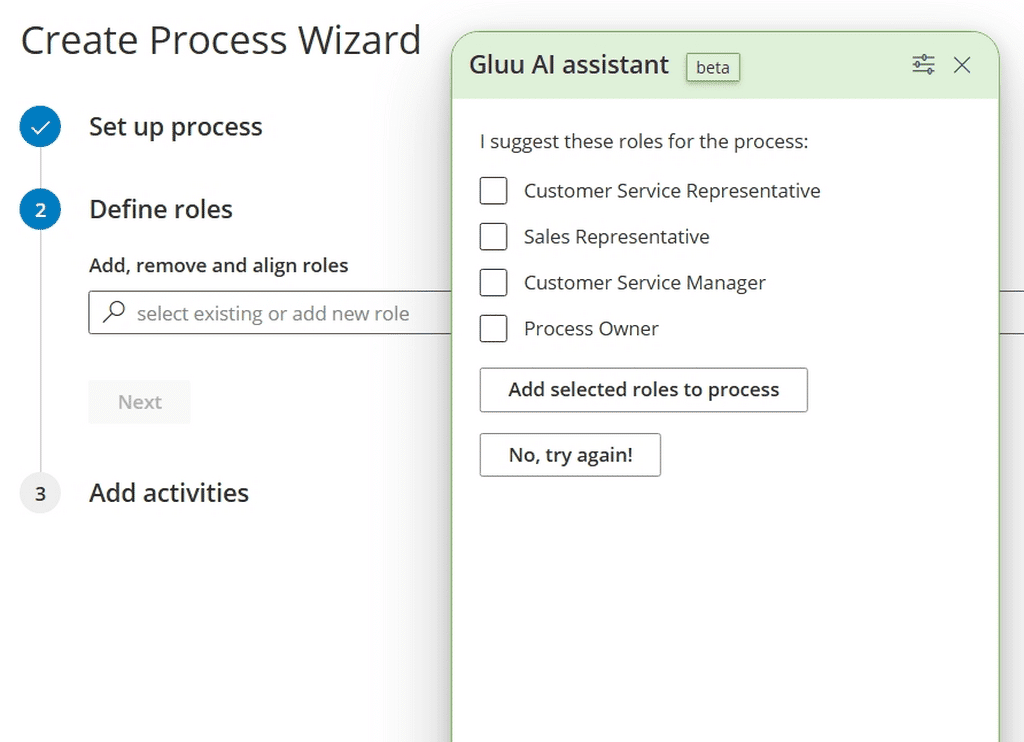
Define the roles. The Assistant suggests the roles involved. Keep the ones that fit, add any it missed, and order them — each becomes a swimlane in the diagram.
Map the flow. For each role, the Assistant suggests activities. Rename them, set their outcomes, and drag them into the right sequence. Click Done and Gluu creates the draft diagram.
Add precision in the editor. The wizard lays down the flow from start to end; gateways, events and the rest of BPMN 2.0 are added in the full editor — on the same diagram, so nothing is redrawn. You can reopen the wizard at any time.
Publish when it is ready. Until then the process stays a private draft, visible only to you and the editors you invite. See the full walkthrough in the guide to mapping a process.

Availability
Automatic process creation with AI is included in every plan — Core, Essential and Advanced. AI-drafted work instructions require the Essential plan or above, and translated instructions require the Localization add-on. See what each plan includes on the pricing page.
Why it holds up
Built on real BPMN 2.0, not a picture of one
AI-drafted doesn’t mean improvised. What the wizard produces is a BPMN 2.0 diagram, not a picture of one — it opens in Gluu’s full editor, where a specialist adds the gateways, events and notation the wizard leaves out.
That also means nothing goes live by accident. Every AI-drafted process stays a private draft, visible only to you and the editors you invite, until someone decides it’s ready to publish.
And because the draft and the advanced diagram are the same file, not two different tools, a BPMN specialist can pick up exactly where the AI left off — no redrawing, no translation between formats.
Beyond the diagram
AI keeps working after the diagram is drafted
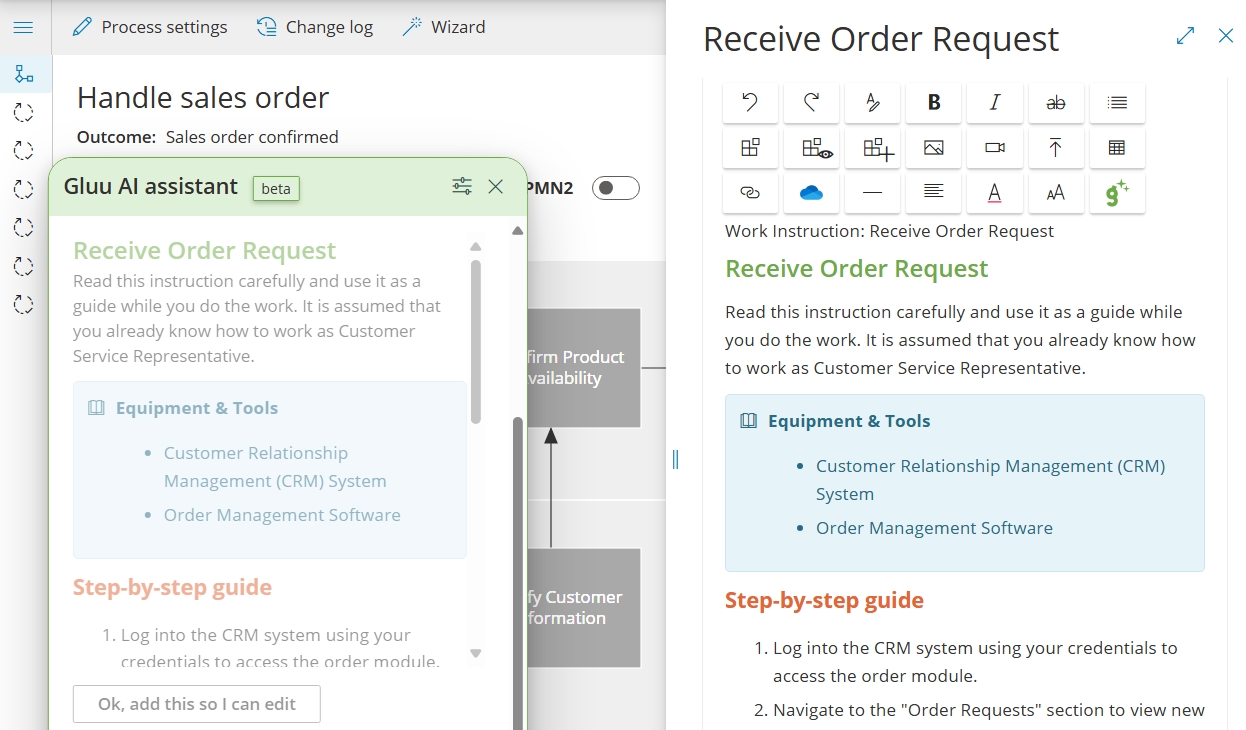
Work instructions, drafted per activity. Open any activity, ask the Assistant for instruction text, and it drafts the Why and How from your own notes, files and common industry practice — a starting point to edit, not a blank field. Requires the Essential plan or above.
Hierarchy suggestions as you build. The Assistant can also propose missing categories and groups in your process hierarchy, so a new process lands somewhere sensible instead of at the bottom of a list. To start from a full industry framework instead, see the APQC framework import.
Built to keep up
What happens when the process changes?
Reopen the wizard, don’t redraw the diagram. When a process grows, you can switch back to the wizard instead of working in the editor — adding roles and activities the same way you created them.
Instructions in more than one language. With the Localization add-on, the Assistant translates work instructions while respecting your account language — so a map drafted once can be read by teams in several countries.
Frequently asked questions
AI process mapping software turns a written description of how work is done into a draft process diagram. In Gluu, the Assistant suggests the roles and activities involved, orders them into swimlanes, and leaves you an editable private draft rather than a finished map.
Automatic process creation with AI is included in all plans — Core, Essential and Advanced. AI-drafted work instructions require the Essential plan or above. See what each plan covers on the pricing page.
No. The wizard drafts the roles and a sequence of activities from start to end. Gateways, events and the rest of BPMN 2.0 notation are added in the full editor, on the same diagram — so nothing has to be redrawn.
Yes, on the Essential plan or above. Open an activity, ask the Assistant for instruction text, and it drafts a Why and How from your notes, files and common industry practice for you to edit. The Assistant basics guide covers each built-in prompt.
No. It stays a private draft, visible only to you and the editors you invite, until someone publishes it to the wider team.
Yes. You can reopen the wizard at any time instead of working in the editor, which makes it as useful for extending an existing process as for creating a new one.
Written and reviewed by
Last updated
All Features
Keep exploring the platform
Ready to draft your first process with AI?
Gluu free 30-day trial. No credit card required. Start from €24 / year.