
Features /
Integrations & API
Integrations that connect processes to your systems
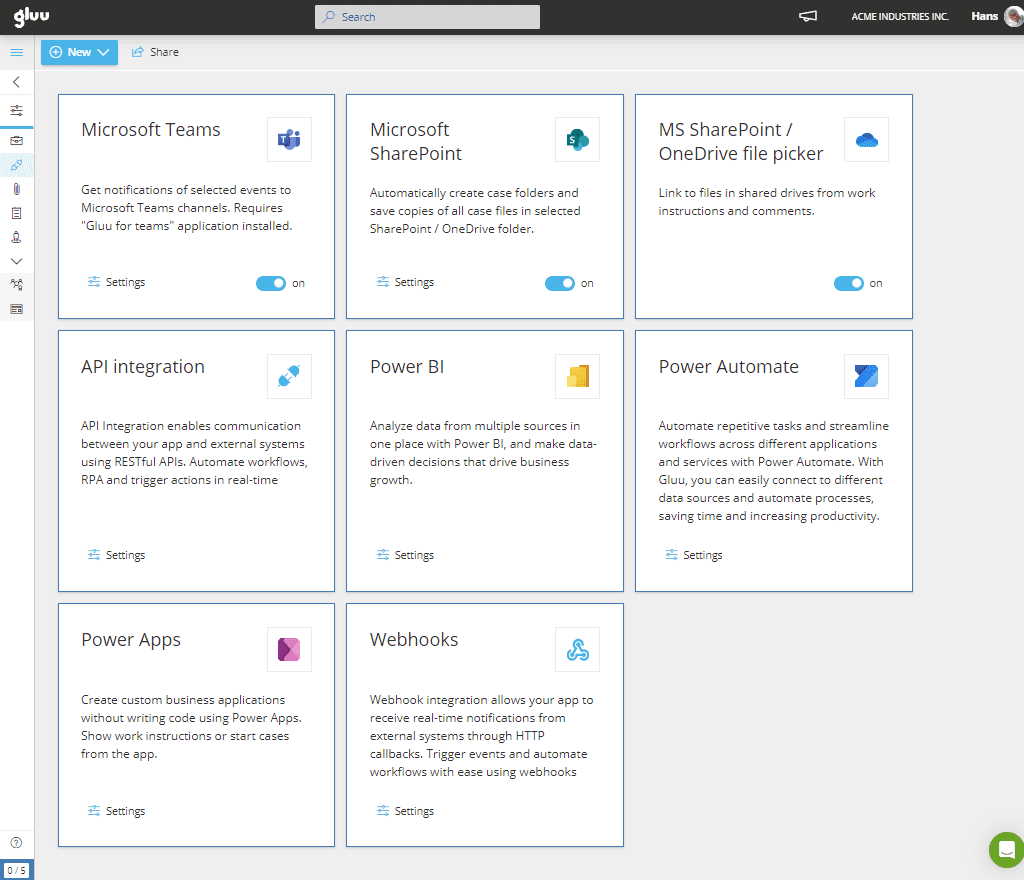
Gluu connects its processes, activities and cases to the systems work already runs in: a REST API and webhooks for your own builds, connectors for Power Automate, Power Apps and Power BI, SharePoint folders for case files, and Microsoft Azure AD single sign-on for every user.
✓ REST API and webhooks
✓ ISO 27001 compliant
What it is
Process management software integrations are the routes in and out of the process repository: the API, the webhooks and the ready-made connectors that let other systems read what Gluu knows and act on it. Without them, a process platform becomes one more place to keep updated by hand.
In Gluu, the same data your teams work with — Processes, Activities, Roles, Cases, Case Tasks and Form Data — is reachable through a REST API and pushed out through webhooks. Ready-made connectors cover Microsoft Power Automate, Power Apps and Power BI; case files can live in SharePoint; sign-in comes from Microsoft Azure AD; and AI chat tools can query the repository through Gluu’s MCP integration. Start with API and integration basics for the technical detail, or see how the processes themselves are built under process management.
Why it matters
Why connecting the process repository matters

One source of truth, not another silo
A process platform nobody can read from becomes a second system of record. Gluu’s data leaves through a documented REST API and webhooks, so processes stay usable in the systems your teams already report and work in.

Automation that hangs off a governed process
Flows and apps built on Power Automate and Power Apps can work with Gluu’s own data, so an automation refers to a documented process with a named owner instead of a private script nobody inherits.

AI that reads the repository
Gluu’s MCP integration lets AI chat tools query the process repository directly, so an assistant answers from what your organization has documented rather than from what it can infer. It is in beta today.
Nine ways in and out
How does Gluu connect to your other systems?
REST API
Read and write Gluu’s own data from your systems. The built-in API browser lists the endpoints available to your account.
API & Connectors add-on
Webhooks
Push events out of Gluu as they happen, so another system reacts without polling for changes.
API & Connectors add-on
Power Automate connector
Work with Gluu data inside Microsoft Power Automate, so a Gluu process is part of a wider automation instead of a parallel one.
API & Connectors add-on
Power Apps connector
Build a Power App on top of the same processes, tasks and form data your teams use in Gluu.
API & Connectors add-on
Power BI connector
Report on Gluu data in Power BI — see reporting on Gluu data in PowerBI, or the worked S&OP dashboard example.
API & Connectors add-on
SharePoint for case files
Create a SharePoint folder per Case automatically, export case files to it, and clone document templates into it. See syncing case files to SharePoint 365.
See how SharePoint case folder sync works →
API & Connectors add-on
SharePoint and Google Drive files
Point activities and work instructions at files that stay where they already live, instead of copying them into Gluu.
Essential plan and above
Microsoft Azure AD single sign-on
People sign in with their Microsoft account. See the SSO configuration guide.
Included in every plan
MCP for AI chat tools
Let an AI chat tool query your process repository through Gluu’s MCP integration, so answers come from documented processes.
Beta
Availability
The REST API, webhooks and the Power Automate, Power Apps and Power BI connectors are part of the API & Connectors add-on, which you can add to the Essential or Advanced plan. Microsoft Azure AD single sign-on is included in every plan, and pointing activities at SharePoint or Google Drive files needs Essential or above. See what each plan and add-on includes on the pricing page.
Frequently asked questions
Yes. Gluu exposes its own data — Processes, Activities, Roles, Cases, Case Tasks and Form Data — through a REST API, with a built-in API browser that lists the endpoints available to your account. See API and integration basics.
The REST API, webhooks and the Power Automate, Power Apps and Power BI connectors come with the API & Connectors add-on, which can be added to the Essential or Advanced plan. Microsoft Azure AD single sign-on is included in every plan. See the pricing page.
Yes. Gluu ships a Power Automate connector, so Gluu data can be part of a wider Microsoft automation rather than a parallel one. It is part of the API & Connectors add-on.
Yes, through the Power BI connector. The documentation walks through reporting on Gluu data in PowerBI, and there is a worked example of building an S&OP dashboard from it.
Yes — single sign-on via Microsoft Azure AD, included in every plan. The SSO configuration guide covers the setup.
Yes. Gluu’s MCP integration lets AI chat tools query the process repository, so an assistant answers from what your organization has documented. It is in beta today.
Written and reviewed by
Last updated
All Features
Keep exploring the platform
Ready to connect Gluu to your stack?
Gluu free 30-day trial. No credit card required. Start from €24 / year.