
Frequently Asked Questions
Here we are collecting the questions that we most often get from prospective customers – and the answers we give.
Table of contents
- Frequently Asked Questions
- Authorization and access control
- Certifications and standards
- Data import and export
- Ease of use for end users
- GDPR compliance
- Implementation, training and support
- Integrations
- Localization and language support
- Pricing, licensing and purchasing
- Revision history and change logs
- Roadmap and releases
- Security, hosting and backup
- AI & Technology
- User management
- Working with consultants
- Options for leaving Gluu
Authorization and access control
Your Gluu account can be accessed in the following ways:
• Via modern web browsers.
• Via Android or Apple apps – e.g. by scanning a QR code with the device.
• Via a desktop app.
• Via Gluu’s Microsoft Teams app.
This means that business users can access relevant data whether in the office, at home, on the factory floor or on the road.
Yes, Gluu lets you add your company’s Azure tenant ID and then you’re ready for any users in your domain to sign in. You can also set specific AD groups that are allowed to sign in, in case you want to limit access. This is all done with ease by your administrator in ‘Manage settings’.
Gluu supports Single Sign On (SSO) via Microsoft or Google.
When signing in via Microsoft, for instance, users just click on the Microsoft button and are automatically authenticated against your organisation’s user list. We can also give specific Microsoft AD groups within the business access to Gluu so if they leave the company they automatically can’t get into Gluu. This also makes it possible for you to have integration options such as SharePoint.
Certifications and standards
Yes. Gluu has implemented and follows an ISO 27 001 based Information Security Management System. Gluu values information security management highly and does the utmost to protect our customer’s data within Gluu’s own ecosystem of IT interrelated services.
Gluu is committed to protecting the security of its business information in the face of incidents and unwanted events and follows and adheres to the principles stated in our Information Security Management System (ISMS), that is compliant with ISO/IEC 27 001:2022. The ISMS has not been officially certified yet, but Gluu strives to be fully ISO 27 001 compliant.
Currently Gluu has put the following documents and control mechanisms in place according to the requirements set out in ISO/IEC 27 001:2022:
• Information security policy (ISMS)
• Statement of Applicability (SoA)
• Risk register and treatment plan
• Personal data policy
• Acceptable use policy
• Access control policy
• Records retention policy
• Backup policy
• Information classification policy
The above is implemented, updated, and managed using Gluu’s own business process management system.
Upon request the ISMS policy can be forwarded digitally and formally introduced by Gluu’s ISO 27 001 responsible.
Yes. Gluu is designed for both business users and process specialists.
Business users require simple diagrams that are easy to read without any prior knowledge. This is why, by default, Gluu offers a mapping to the basic levels of BPMN 2.0 – Swimlanes, Activities, Gateways and Events.
On the other, process specialists may require the full BPMN 2.0 notation for advanced use. This is why you can enable BPMN 2.0 as optional or required when mapping processes. This includes the full notation framework with more than 55 shapes.
Yes, auditors say that using Gluu will bring you 85-90% of the way towards an ISO 9001 certification. The reason is that you can use Gluu to set up and run a complete, integrated management system.
Yes, the American Productivity & Quality Center (APQC®) framework is supported. This means that you can recreate the four levels of your chosen industry standard inside Gluu’s process hierarchy. You can even import APQC processes from the Cross-Industry framework directly to Gluu.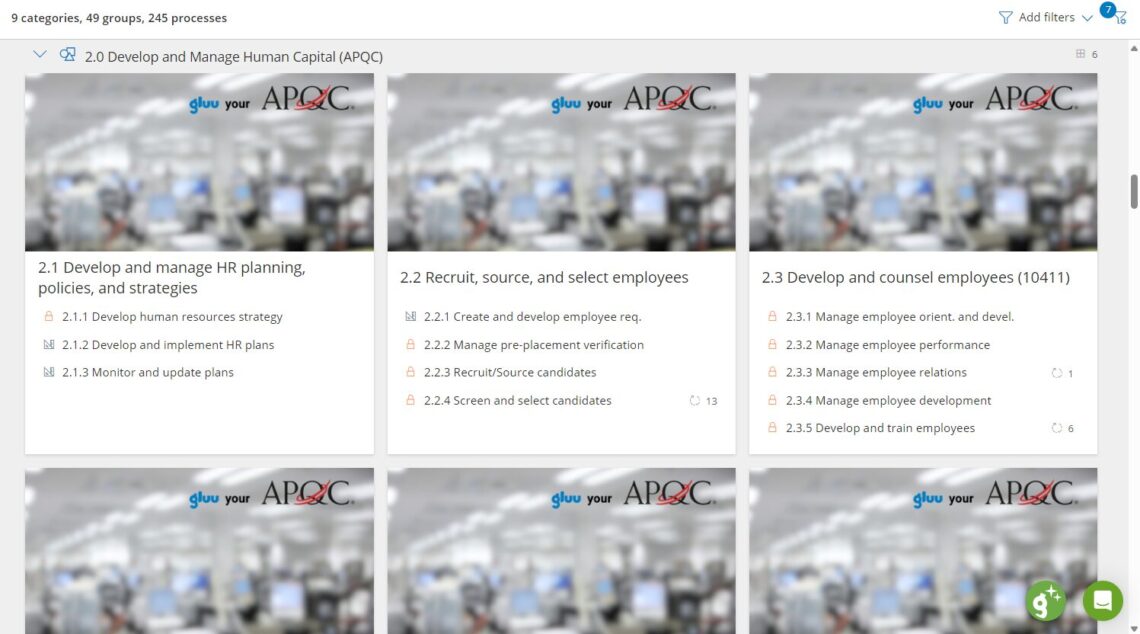
APQC example with Gluu
Data import and export
Yes. Processes compatible with the latest version of Microsoft Visio and saved in BPMN format can be imported into Gluu.
Yes. In fact the cross-industry APQC® is built into Gluu so you can quickly decide which categories, groups, processes and activities to add.
Yes. In Gluu you can export your processes via .svg which can be imported in Microsoft Visio and other systems.
Ease of use for end users
It is indeed important that software requires little from business or end users. This is why Gluu requires nothing more than a modern web-browser or an Android or Apple device for access. You simply just go to Gluu and sign in with your company’s own Microsoft credentials.
Normally anybody with just a basic level of IT knowledge (similar to working with Office 365) can work with Gluu after a short 15-minute introduction. We recommend a train-the-trainer model, where Gluu trains your core team and your process owners. They then introduce your end users to how they find and use processes, cases and tasks and ask questions and give feedback.
GDPR compliance
Gluu is delivered from Amsterdam and Dublin. This is also where primary and backup data is stored. This means that no data is transferred to third party countries (as required by GDPR). You can learn more about Microsoft’s Data Residency in Azure here.
Gluu primarily uses Microsoft to deliver our services. A full list of our ‘Authorised sub-processors’ of data is listed in our common Data Processor Agreement.
No, we do not require or encourage any entry of sensitive data on the platform. However, you can choose to add this type of information and should you want to do so, we offer advanced solutions for encryption at an added cost.
In order to comply with GDPR rules, Gluu, as a data controller, must delete personal data when it is no longer necessary to process the data to fulfil the purposes of the processing.
The duty to delete applies to:
• Employees’ and applicants’ personal data that is processed as part of recruitment, existing employment relationships and terminated employment relationships.
• Users (employees) on customer’s accounts.
Information is deleted in the following ways:
Employee information – within five years after the person has left Gluu.
Implementation, training and support
Gluu offers support via the following channels:
• Online, self-service Documentation Center with more than 100 articles.
• YouTube channel with how-to videos.
• Support by email.
• Chat support from inside the application.
Custom support models and service levels are offered to customers that use our Enterprise Services.
Gluu’s support hours are 8am-10pm CET with fastest response between 9am-6pm. All support inquiries are handled by experienced human staff.
Median first response time is 10 minutes, while median time to close is around 3 hours.
Gluu guarantees the uptime for the Service to be no less than 99.5% measured over a year (12 consecutive months). The measurement of uptime is done by an external service provider and reports are sent to customers on request.
Integrations
Gluu has a token-based, open REST-based web API. This means that you can connect to any information in your Gluu account from other business systems.
Yes, Gluu integrates with SharePoint 365 in two ways: [PLACEHOLDER — the two integration methods need to be filled in; see note]
Gluu’s open, token-based REST API lets you easily integrate with almost any web application. Both ‘post’ and ‘get’ methods are supported so that you can send Gluu data to your other applications or get third party data into Gluu.
All access is encrypted and accessible via end points that use the OpenAPI 2 (OAS) standard. End points can be browsed by your internal and external developers using Swagger.
We have built native integrations for applications such as Microsoft Teams, SharePoint, OneDrive, PowerBI, PowerAutomate and Power Apps.
Yes, this is relevant when you know which activities require a lot of interaction with SalesForce. You can then have a form from SalesForce showing in Gluu so that you can just fill in the fields without having to enter SalesForce.
Localization and language support
Gluu currently supports English, German, Danish and Greenlandic (the Government of Greenland is a customer of ours).
Enterprise customers can request additional languages. Just ask your Gluu representative.
With Gluu you can translate and localize selected content in a targeted way. This means that e.g. if you have production in another country, then you can select to translate specific work instructions for blue collar workers in that country, while keeping the rest in your main language.
This Enterprise feature offers the following advantages:
• Translate selected processes and/or work instructions to languages that are used in e.g. offices and production facilities in other countries.
• Users will only see the translated content if the translation language has been selected and if the process or its work instruction have been translated. So, you don’t have to translate all content but can focus on only relevant processes.
• Maintain documentation in a master language while easily doing 1-to-1 translations for local audiences.
• Monitor if changes have been made to the master language that are not reflected in the translation.
Pricing, licensing and purchasing
In short, Gluu has subscription levels for every step in an organisation’s process journey – going from mapping to full Business Process Management. You can see a detailed feature comparison on our pricing page.
Yes. Gluu is built on the insight that to achieve process excellence you need to engage business users. This requires everyone to be able to personalize their access to information and to ask questions or give feedback.
Yes, volume discounts are built-in and based on threshold – so once you reach e.g. 50 users then all subscriptions will become cheaper. You can calculate by plan on our pricing page.
Company name: Gluu ApS
VAT registration number: DK33886349
Invoice Currencies: USD / EUR / DKK
Country: Denmark
Phone number: +4572302070
Company address: Svanevej 22, DK-2400 Copenhagen NV
Bank’s name: Danske Bank
Bank account: DK7330000010971896
SWIFT-code: DABADKKK
Revision history and change logs
Gluu stores all actions by users as events. This means that new versions of content are created every time someone saves something. There are five ways to see this:
An audit trail (also called audit log) is a security-relevant chronological record, set of records, and/or destination and source of records that provide documentary evidence of the sequence of activities that have affected at any time a specific operation, procedure, or event.
Gluu stores all actions by users as events. With Gluu’s audit trail you can view all the activities in your account and sort by time or topic.
Yes. Every time a Process Owner or Editor saves a process Gluu will prompt the person and ask if it should be saved as a new version and/or communicated to users who have a role in it. This way, Gluu makes it easy to keep accurate change tracking and communicate with the users that need to know.
Roadmap and releases
Gluu releases new features and improvements approximately 8-10 times per year. Each release goes through a rigorous process of testing.
Gluu gives Enterprise customers the ability to test with a copy of their own data to ensure that there are no unintended consequences.
Yes, if tests by Enterprise customers show any issues, then Gluu will pause the release until any bugs or design issues are resolved.
Security, hosting and backup
Gluu is hosted and delivered from Microsoft’s European data centres in Amsterdam and Dublin. This means that all data is stored within the EU (ensuring compliance with GDPR).
All your data is backed up continuously via Microsoft’s Azure services. This means that every 3-5 minutes a backup is made. This is stored for 35 days on a rolling basis.
No, this is not possible. However, we do offer the ability to host Gluu in your organization’s own Azure environment. This is our so-called ‘Private tenant’ option where Gluu is managed within your own Azure instance with the ability to test and approve new releases and control this fully.
This option is available via our Enterprise plan and at additional service cost.
When you work with drawing processes and creating work instructions then your work is backed up using your browser’s storage. The result is that even if your internet connection is lost, then your work will still be available for saving to Gluu’s servers once your connection is restored.
Yes, Gluu has customers that run more than 1,000 processes using Gluu. These can be connected and activities can be reused.
Yes, Gluu conducts regular security vulnerability assessments using accredited, third-party tooling. Reports are available for customers on demand.
Yes, Gluu conducts regular penetration tests using accredited, third-party security experts that perform white-hat hacker style attacks.
All communications with servers are encrypted by default using industry standard SSL (256-bit encryption, 2048-bit root and domain control validation). This ensures that all traffic between you and Gluu is secure during transit. Unlike email-based communication, most of which flows unprotected over the Internet, your communication with Gluu is completely protected.
Your data in Gluu is encrypted with ‘Transparent Data Encryption’ for Azure SQL via Microsoft.
Gluu is developed with an event sourcing architecture. This means that all user actions are tracked and stored as events and accessible in your account’s audit trail.
“Events are immutable. Because events happen in the past, they cannot be changed or undone. However, subsequent events may alter or negate the effects of earlier events. For example, “the reservation was cancelled” is an event that changes the result of an earlier reservation event.”
Source: Microsoft
Gluu has tested processes for data recovery. A simple recovery of data can therefore be completed within two hours, where a full recovery (including when configuration data has been lost) can be completed within one business day.
AI & Technology
A modern and widely used tech stack is indeed important. This is why Gluu is built on Microsoft Azure, .NET, Angular and Node.js.
Gluu is delivered as a multitenant solution. This ensures high scalability and focus since all our customers are ‘in the same boat’ meaning that any problem identified for one customer will be solved for all. While functionality is shared, we ensure that all data is segregated by account. This means that your data is stored separately from others.
Gluu’s built-in AI assistant uses OpenAI’s API to help you with content creation and other regular tasks under OpenAI’s Enterprise Privacy agreement. This means that no data is used for training LLMs. Additionally, Gluu’s admin users can decide which prompts to enable for specific permission groups. This lets you control exactly which data is shared with OpenAI.
User management
Gluu lets you assign access rights in two ways:
• Process-based permissions: You can assign users the rights to fully manage and edit specific processes.
• Permission groups: You can assign users role-based access control to specific general features.
You can read more about access control and rights in our Documentation Center.
Gluu offers multiple options for access control. You can either offer access by process or by role. The first option is useful if you want to give a business user the ability to fully own and work with selected processes. The second option is useful for creating custom ‘permission groups’ and assigning users, or groups of users, to these. This lets you create e.g. Admin roles, etc.
You can read more about access control and rights in our Documentation Center.
Business process management that does not involve continuous communication with end users has only limited value. This is why Gluu offers the following ways of communicating with your end users:
You can read more about communications with Gluu in our Documentation Center.
We offer an integration to your company’s Active Directory Services (ADS) as well as Active Directory Federation Services. This will ensure that new employees automatically will be added to the Gluu platform. Also, employees that are removed from your ADS will automatically be disabled inside Gluu.
You can select the processes that this specific person owns and then bulk edit to set new owner.
Working with consultants
Yes. We can certainly involve and train your preferred consultants. This only requires they have experience with business process management in general and / or facilitation.
We do offer implementation support and ongoing tool support via our Customer Success program. If you need industry specific support to create best-practice processes, then we recommend our experienced consulting partners.
Options for leaving Gluu
Yes, of course. We don’t want to hold anyone hostage. This is why we make it easy to print each process, role and activity page. You can also export your process, activities and task history as .csv files for use elsewhere.
Yes. You can do this in two ways: 1) via Gluu’s API that gives you access to all your own data or 2) via Gluu’s native SharePoint integration that saves copies of all tasks, forms and cases completed in Gluu in automatically created case folders on SharePoint. This gives you a duplicate of all important records that can also be used by non-Gluu users.