
Features /
HR Manager add-on
HR case management that keeps employee data confidential
The HR Manager add-on adds HR case management to Gluu: mark a Case confidential so only assigned Roles or people can see it, track Competencies and Certificates against each Role, run multiuser Training, and print a CV from a User’s Roles, tasks and competencies.
 Case visibility restricted by role, not by default
Competencies, training and CVs in one add-on

What it is
The HR Manager add-on layers HR case management onto Gluu’s existing Role and User model. Mark any Case confidential and it disappears from general visibility — restricted to specific supervisor Roles or just the assigned User — instead of sitting open to everyone with access to that process, the way a routine case would.
It builds directly on role and competency management: the same Competencies — a 1-5 rating or an expiring Certificate — that show who’s qualified for a Role also populate each person’s profile, and a printed CV pulls their Roles, tasks and competencies together in one document.
Why it matters
Why keep HR cases in the same system as your processes?
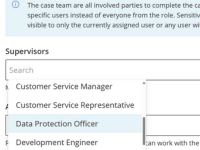
Sensitive conversations stay off the general radar
A development, salary or sick-leave conversation lives in Gluu as a confidential Case, visible only to the roles or people you name — not to everyone who can otherwise see your cases and processes.
HR Manager add-on
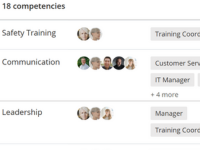
You know who’s qualified before you assign work
Competency ratings and certificates sit against each Role and each User, so a gap between what a Role requires and what a person actually holds is visible before you hand them the work, not after.
HR Manager add-on
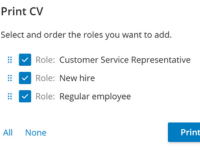
Training and audit records skip the spreadsheet
Launch a multiuser Training to bring a whole Role up to standard at once, and print a CV straight from a user’s roles, tasks and competencies when an auditor or certification body asks for proof.
HR Manager add-on
What customers say
“There’s some confidentiality around this, and that’s where Gluu really comes into its own — we can extend the system to cover development conversations, salary conversations, sick-leave conversations and other confidential conversations with employees.”
Holbøl, Danish contracting and entrepreneurial company
How it works
How does the HR Manager add-on work in Gluu?
The add-on is four capabilities layered onto your existing Roles and Users. Step-by-step instructions live in Gluu’s help center: see how to work with competencies and how to create and manage forms, including the Competency field type used to capture ratings and certificates.
1. Track competencies against each role
Attach one or more Competencies to a Role as a requirement — a 1-5 rating or a Certificate that can expire — and Gluu compares that against what each assigned User actually holds.
2. Mark a case confidential
Open a Case — an employee development conversation, for example — and restrict its visibility to specific supervisor Roles or just the currently assigned User, instead of leaving it open to the team.

3. Run a multiuser training
Launch a Training across every User in a Role at once — a safety certification, for example — rather than assigning and tracking it person by person.
4. Print a CV from the employee profile
Select which Roles to include and generate a CV straight from a User’s assigned Roles, tasks and competencies — useful for audits, onboarding packs, or proving capability to a certification body.
Availability
The HR Manager add-on is available on the Advanced plan. Building the underlying role library is included in every Gluu plan — competencies, confidential cases, multiuser training and CV printing are the HR Manager add-on on top. See what’s included in each plan on the pricing page.
Frequently asked questions
It’s the add-on that layers HR case management onto Gluu’s Role and User model: competency ratings and certificates, confidential case handling, multiuser training and CV printing. It requires the Advanced plan.
Mark the Case confidential and restrict its visibility to specific supervisor Roles or the currently assigned User. Everyone else with normal access to your processes and cases won’t see it, the same way process-level permissions already control who sees what.
Competency data sits on each User’s profile in Gluu. As with everything else in Gluu, what a specific person can view depends on the permissions and roles assigned to their account.
No. Gluu ties competencies, cases and training records to the process work they support, rather than managing HR records or payroll generally. Use it alongside your HR system for the process and qualification side of HR work.
A Role is the functional job — its purpose and the swimlane lane it owns in a process. A Case is a live, running instance of a process, which can be marked confidential. A Competency is a 1-5 rating or an expiring Certificate attached to a Role as a requirement and to a User as what they hold.
Competencies, confidential cases, multiuser training and CV printing all need the HR Manager add-on on the Advanced plan. Building the underlying role library is included in every Gluu plan. See the pricing page for details.
Written and reviewed by
Last updated
All Features
Keep exploring the platform
Ready to run confidential HR cases in Gluu?
Gluu free 30-day trial. No credit card required. Start from €24 / year.