
Features /
Add-ons
Enterprise Customization, built into Gluu
Enterprise Customization is a Gluu add-on that lets an organization extend its account with its own data: custom fields on processes, activities, roles and users, profiles that tailor navigation per audience, saved filters, and AI that rewrites work instructions to match a defined standard.
 8 custom field types
Essential & Advanced plans
What it is
Enterprise Customization is the add-on that shapes Gluu’s data model and interface around one organization’s own vocabulary, instead of a generic default. It unlocks custom fields on Process, Activity, Role, User, Category, Group and Case Task records; Profiles that tailor navigation, the overview and visibility per audience; and Activity Instruction Rules, which let an admin define a work instruction template and have Gluu’s AI assistant draft or rewrite instructions to match it.
It’s one of Gluu’s add-ons — the modules that extend an Essential or Advanced plan with a specific enterprise capability rather than a bigger base plan.
Why it matters
What you gain from enterprise customization

The system matches how your organization is built
Without a way to add your own data — a PCF ID, a risk rating, a certification date — teams end up bending a generic field to fit, or keeping the real detail in a spreadsheet next to Gluu instead of inside it.

People see exactly what their role needs
One navigation for everyone means frontline staff wade through admin settings they’ll never touch, and admins field a steady stream of “where do I find X” questions instead of just handing out the right profile.

One instruction standard, not a hundred writing styles
Without a shared template, every author writes work instructions differently — some thorough, some thin — and rewriting hundreds of activities by hand to fix that isn’t realistic. Defining the standard once and letting AI apply it is.
What’s included
What do you get with Enterprise Customization?
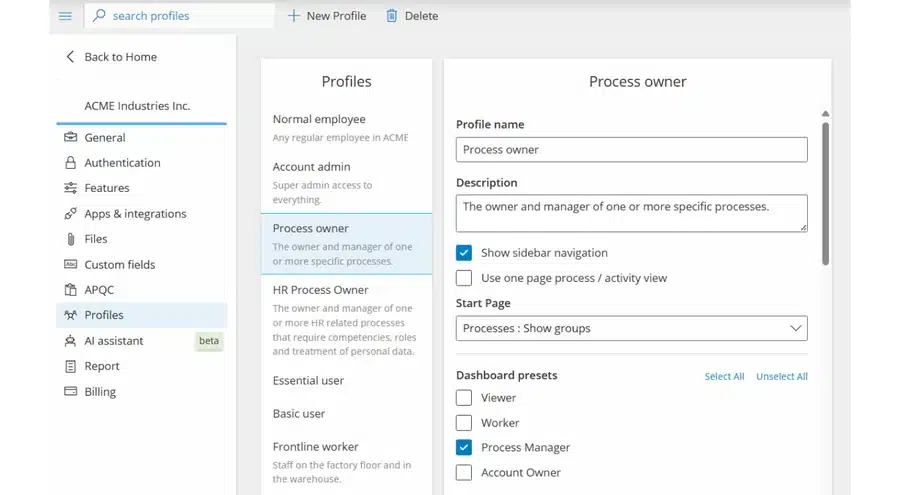
User profiles and custom views
Build named profiles — Process owner, Frontline worker, Account admin — that set the navigation, start page and dashboard presets a person sees, then assign them from the user page. Personal work overviews layer saved filters and form data on top.
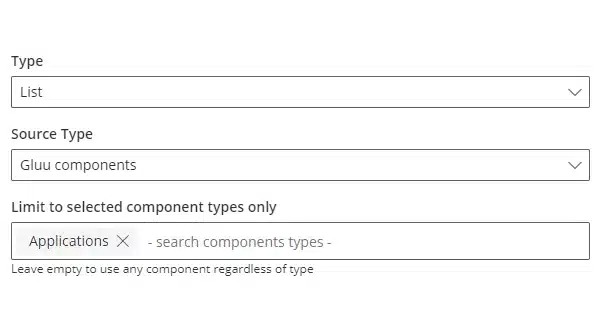
Custom field creation
Add fields to Process, Activity, User, Role, Category, Group or Case Task records, in eight types from free text to component lookups. Mark a field protected to encrypt its value and restrict who can see it. Once created, a field’s type and object are locked.
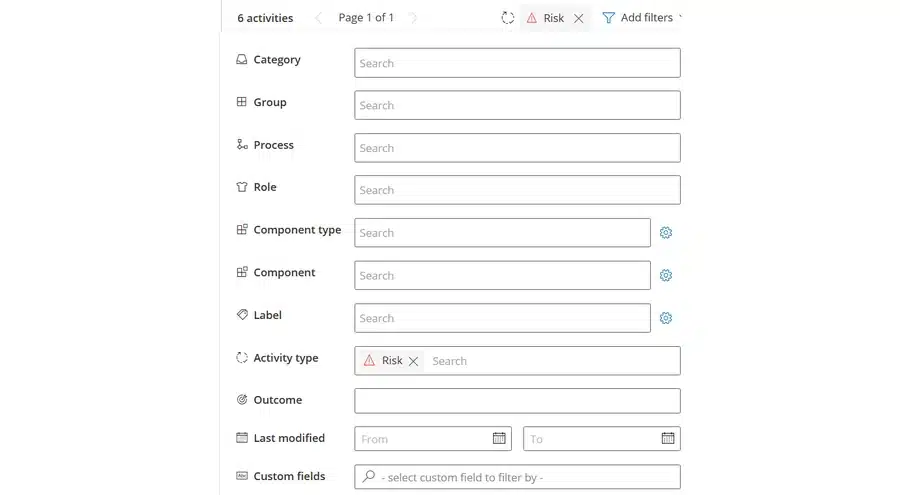
Save custom filters
Filter activities, tasks or cases by category, role, label, custom field and more, then save the combination and, if you manage the account, share it with everyone. Saved filters can be pinned to a work overview as a live card.
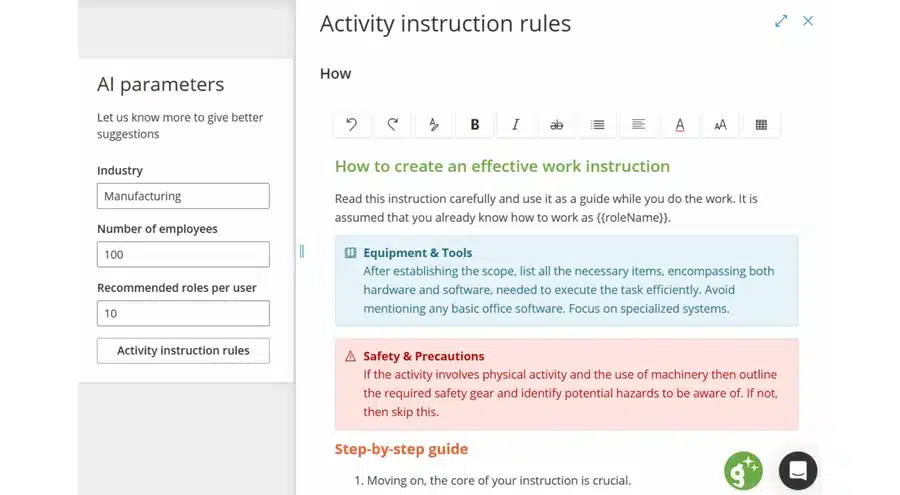
Enforce work instruction standards with AI
Define the structure every work instruction should follow, then have Gluu’s AI assistant write new instructions to it or rewrite existing ones to match — without losing the content already there.
How it works
How does Gluu enforce work instruction standards with AI?
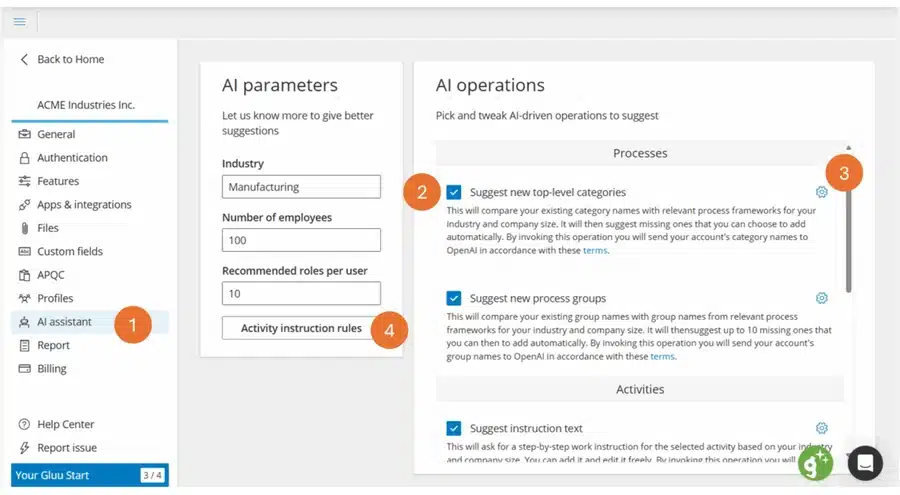
Define the standard once
Under Manage account > AI assistant > Activity instruction rules, an admin sets the structure every instruction should follow — for example a Why section capped at 150 characters, then numbered How steps — and the helper text authors see while they write.
Let AI write or rewrite to match it
On any activity, the AI assistant can draft a new instruction against the template or rewrite an existing one to fit it — reading the current notes, media and links first so nothing gets dropped in the process. Every AI-written change still goes through Gluu’s normal versioning and approval flow, exactly like one a person typed.
Availability
Custom fields, profiles and AI-enforced instruction standards require the Enterprise Customization add-on, available on the Essential and Advanced plans. Saved and shared filters are already included from the Essential plan on its own. See what’s included in each plan on the pricing page.
Frequently asked questions
It’s the Gluu add-on that lets an account extend its data model and interface with its own fields, profiles and views, plus AI-enforced work instruction standards, on top of an Essential or Advanced plan.
Essential and Advanced. The pricing page has current pricing.
Not its type or the object it’s attached to — once a field is created, both are locked permanently. Plan the field type and target object (Process, Activity, User, Role, Category, Group or Case Task) before creating it.
Yes. Mark the field protected when you create it and its value is encrypted at rest and hidden by default; account managers and users with both manage-processes and manage-labels permissions can always see it, and you can grant others access through permission blocks.
No. Saving and sharing filters is available from the Essential plan on its own. This add-on adds the profiles, custom fields and AI instruction standards on top.
No. When you ask the AI assistant to rewrite an instruction to match the template, it reads the existing notes, media and links first and writes the new version from that content, then routes the result through Gluu’s normal versioning and approval flow before it replaces anything.
Written and reviewed by
Last updated
All Features
Keep exploring the platform
Ready to customize Gluu for your enterprise?
Gluu free 30-day trial. No credit card required. Start from €24 / year.