
Work Instruction Examples: The ultimate guide to writing

Every mistake on the shop floor, every inconsistent customer experience, every costly re-work — most of them trace back to the same root cause: people doing the same task in different ways. Fortunately, clear documented guidance fixes that. This guide explains what work instructions are, how to write them in seven steps, and shows you real-world examples across five industries so your team can start today.
What are work instructions?
Work instructions are step-by-step guides that tell a specific person exactly how to perform a specific task. In other words, they answer the question “How do I do this?” — not “What should we achieve?” or “Why does this process exist?” That narrow focus is what makes them powerful.
Think of them as the GPS of your operation. A GPS doesn’t explain the history of road design; instead, it tells you to turn left in 200 metres. A good task guide does the same — it reduces hesitation, prevents errors, and lets people focus on doing rather than figuring out. See the full definition here.

SOP vs work instructions: what’s the difference?
People confuse these two all the time, and the confusion costs them. An SOP (Standard Operating Procedure) describes what a process looks like end-to-end and sets the overall standard. A work instruction, by contrast, zooms in on a single task within that process and describes how to execute it, step by step.
An SOP says “inspect the equipment before use.” A work instruction tells you exactly which seven checks to perform, in which order, and what a failed check looks like.
| Dimension | SOP | Work instruction |
|---|---|---|
| Scope | Whole process or department | Single task or step |
| Audience | Process owners, managers | Frontline workers |
| Detail level | High-level overview | Granular, step-by-step |
| Format | Narrative or flowchart | Numbered list, visual, video |
| Example | “Handle customer complaints within 24 hours” | “Step 1: Open ticket. Step 2: Select category…” |
Why your team needs digital task documentation
Paper-based guides get lost, go out of date, and sit in a binder nobody reads. Digital documentation solves all of that — and does much more. Here’s why the switch matters.
Single source of truth. Everyone sees the latest approved version instantly. As a result, version chaos disappears because only one live document exists.
Faster onboarding. New hires get GPS-like guidance that lets them contribute sooner. For example, one Gluu customer cut onboarding time by 5x after switching to digital task guides.
Visual clarity. The human brain processes images 60,000 times faster than text. Consequently, video and annotated photos communicate complex steps that paragraphs never could.
Point-of-work access. Workers pull up step-by-step guides via mobile or QR code exactly where and when the task happens — no desk required.
Built-in compliance. The system tracks updates and views automatically. Therefore, ISO and regulatory auditing becomes far less painful.
Continuous improvement. Workers capture real-time feedback from the shop floor, so your documentation stays accurate over time rather than slowly drifting from reality.
Most importantly, clear digital guides reduce costly errors. When steps are visual and unambiguous, people make fewer mistakes — and that directly protects your margins.

A 7-step framework for writing clear task guides
Writing a good work instruction takes less than an hour when you follow a clear structure. The hardest part is usually deciding where to start — so here’s a proven framework that works across every industry and task type.
- Write a clear title. State the task precisely. “Operate injection moulding machine — startup sequence” is better than “Machine startup.” Specificity prevents people from opening the wrong guide.
- State the purpose. One sentence. Why does this task matter and what goes wrong if it’s done incorrectly? This gives workers the why behind the how.
- Break it into numbered steps. Each step = one action. Start every step with a verb: “Press,” “Check,” “Enter,” “Attach.” Never combine two actions in one step.
- Add visuals to every step that needs them. A photo of the correct outcome, an annotated screenshot, or a short video clip removes all ambiguity.
- Simplify the language. Use words a new hire on day one would understand. Replace technical jargon with plain terms. Keep sentences under 15 words.
- Link to related references. If a step requires a form, a checklist, or a related process map, link to it directly. Don’t make people go hunting.
- Test it with a real user. Ask someone unfamiliar with the task to follow the guide. Watch where they hesitate. Then fix those points before publishing.
5 real-world work instruction examples & templates
Theory only goes so far. Let’s look at how these guides translate across five real industries — because the format that works in a factory looks quite different from the one that works on a construction site.
Construction: what a good task guide looks like on site
A construction task guide might cover scaffolding erection, concrete pouring, or electrical installation. Above all, it must identify the responsible role (e.g. Site Foreman) and list required safety equipment before step one. Rather than using generic stock imagery, it uses photos of the actual site. Similarly, regulatory references — like EN 12811 for scaffolding — link out rather than copy in full.
Manufacturing work instruction example
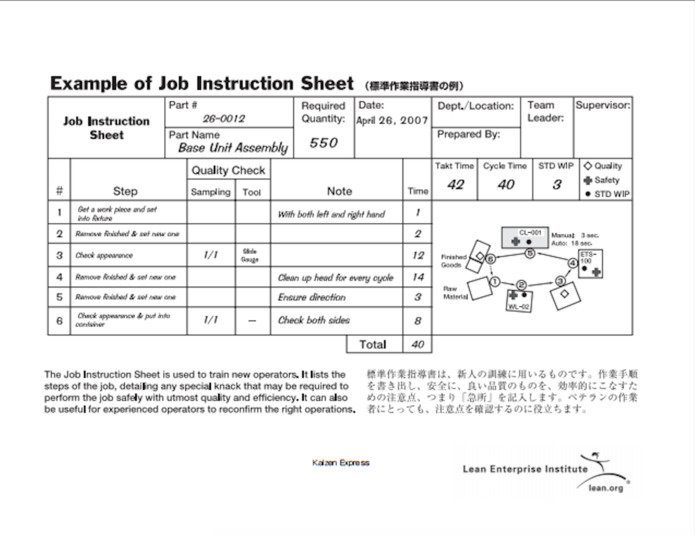
In manufacturing, work instructions often go by the name “standard work.” A machine setup guide, for example, lists torque settings as specific numbers rather than ranges and includes a photo of the correct part orientation. In addition, a sign-off field lets supervisors confirm the setup before production begins — which means fewer costly restarts.
Engineering & technical: step-by-step guides for complex tasks
Technical procedures for software deployment or equipment calibration need version numbers, rollback steps, and decision branches (“If output is <0.5V, proceed to Step 4b”). Because engineers often work across time zones, the guide must stand alone without verbal explanation. As a result, it pays to invest extra time in clear, unambiguous language.
Packing & logistics work instruction example
Packing guides live and die by their visuals. An annotated image showing correct label placement, box orientation, and seal position is worth more than three paragraphs of text. Besides that, clear pass/fail criteria — “box must be sealed on all six sides; photograph any exception” — enable quality checks at the point of work.
Visual and video-based work instruction example
Some tasks are simply too complex for text alone. For instance, a 90-second screen recording of a software process, or a short video of a weld technique, communicates nuance that photos cannot. The best approach therefore pairs a short video with a written checklist — so workers can watch once, then use the checklist for ongoing reference.
See it in practice: how Gluu brings work instructions to life
Want to see how a real organisation uses digital task guides day to day? This short case video shows exactly how Gluu helps teams connect processes, people, and step-by-step documentation on the shop floor.
Why visuals make the difference
Research consistently shows that people retain 65% of information when it’s paired with a relevant image, versus just 10% from text alone. That’s a strong case for building visual, media-rich task guides over plain text documents.
Therefore, the return on investment is measurable. Teams that make the switch report faster task completion, lower error rates, and higher confidence among new hires. Most importantly, visuals remove the language barrier — a photograph of the correct outcome communicates equally well to a native speaker and a worker who is still learning the language.
Want to see how it works in practice? See how Gluu handles this — the platform is built around visual-first design.
Gluu free 30-day trial. No credit card required. Start from €24 / year.
Choosing the right digital work instructions software
So what should you look for? The right tool makes creating, publishing, and updating step-by-step guides as easy as editing a document — without requiring a developer or a three-week implementation project.
Specifically, look for software that supports rich media (video, images, embedded PDFs), role-based access so workers only see what’s relevant to them, and a mobile-first interface that works without a desktop. Version control is non-negotiable: the tool should track every change, and it should keep older versions accessible for audit purposes.
Gluu’s Understand module is purpose-built for this. It connects task documentation directly to your business process management framework, so guides don’t exist in isolation — instead, they live inside the processes they belong to. That context helps workers understand not just the step, but where it fits in the bigger picture.
FAQ – Work instructions
A good example might be a CNC machine startup procedure: Step 1: Power on the machine using the green button on the left panel. Step 2: Load the tool program by pressing F3 and selecting the correct file. Step 3: Zero the X, Y, and Z axes using the jog controller. Notice that each step is a single action, written in plain language, with a clear outcome.
Follow the 7-step framework: write a clear title, state the purpose, break the task into single-action steps starting with a verb, add visuals, simplify the language, link to references, and test with a real user. Above all, the most important test is whether someone unfamiliar with the task can complete it without asking a question.
Standard work instructions are the approved, current version of how a task should happen — the baseline every worker follows. They differ from draft or informal instructions because a manager reviews, approves, and publishes them through a formal process. Most importantly, the team updates them whenever someone finds a better method.
The two most common types are text-based work instructions (numbered steps in written form) and visual work instructions (steps supported by photos, diagrams, or video). Text-based instructions work well for simple, sequential tasks. Visual instructions, on the other hand, work better for complex, manual, or spatial tasks where the correct outcome is easier to show than to describe.
The person who best knows how the task runs — usually the most experienced worker or the team lead — should write the first draft. However, a manager or quality officer should then review and approve the final version. The writer and the approver should not be the same person, because familiarity makes it easy to skip steps that feel obvious but are critical for a new hire.
For most tasks, a numbered list with supporting images is the most effective format. It is scannable, easy to follow in sequence, and simple to update. For highly visual or physical tasks, a short video paired with a written checklist works best. Besides that, digital formats outperform paper for any task that changes frequently or involves a mobile workforce.
The purpose is to ensure that every person performs a task correctly, consistently, and safely — every single time. In practice, they eliminate reliance on memory or tribal knowledge, reduce errors, and accelerate onboarding. Furthermore, they give compliance and quality teams documented evidence of standard practice for audits.