By Søren Pommer
on
Dec 5, 2023
Updated
Feb 3, 2026
Process management helps organizations run the same work the same way—on purpose. It turns “how we usually do it” into clear, owned, measurable flows that improve over time. As a result, teams reduce friction, deliver more consistent quality, and scale without relying on tacit knowledge.
In this guide, you’ll get an introduction to what process management is, how it relates to Business Process Management (BPM), which types and stages matter most, and how to set up governance so improvements actually stick. I will also refer to relevant material for going deeper topics that are especially relevant for you. Now let’s start with the basics:
What is Process Management?
Process management is the discipline of designing, executing, monitoring, and continuously improving how work gets done across an organization. Instead of treating work as a set of isolated tasks, you manage it as an end-to-end flows: roles, steps, handovers, rules, and outcomes. As one of the fathers of modern, scientific management put it:
”If you can’t describe what you are doing as a process, then you don’t know what you are doing.”
It’s closely related to Business Process Management (BPM), which is the broader, systematic approach to improving how a business operates—often including process discovery, governance, measurement, automation, and continuous improvement. In practice, many teams use “process management” as the operational, day-to-day expression of BPM.
So where do projects fit in? Let’s compare the two:
Process management vs. project management
Project management focuses on a temporary and unique effort with a defined start and end—like creating an entirely new product or implementing a new system. Process management focuses on repeatable work—like onboarding employees, handling claims, running recurring projects, monthly closing, or responding to customer requests.
👉 Put simply: projects are for innovation and change; processes run the business.
Naturally, a project may redesign a process, and then process management keeps that new way of working alive. So the two are related and both are indispensable but their management disciplines are different.
Process management covers processes from levels 1-5; from end-to-end processes all the way to work instructions and task management.
👉 If you’re looking to understand the different process levels, then you may find this lesson from our new Gluu Academy relevant:
Types of Process Management
Every organization relies on different types of processes to operate efficiently and achieve its goals. Understanding these categories helps you manage, optimize, and automate processes more effectively.
Information Processes
Collecting, analyzing, and distributing data to support decision-making and business needs.
Management Processes
Planning, controlling, and directing organizational activities to ensure goals are met.
Operational Processes
Executing core business activities, such as production, service delivery, and customer support, while managing resources and workflows.
So how do you approach this area? There are some general stages that I summarize below:
Words like ‘process’, ‘workflow’ and ‘procedure’ are often mixed up. They refer to different process levels that serve different purposes. While some processes are system-driven, others depend on human judgment, and some revolve around documents and approvals. These three types help you choose the right focus—and the right tooling.
“If it doesn’t make at least three people mad, it’s NOT a Process.“
– Michael Hammer and Stanton, 1995
So how do you approach this area? There are some general stages that I summarize below:
Stages of Process Management
A practical process management initiative typically moves through four core stages. They keep the work structured, but still flexible enough to improve continuously.
Analyze and identify processes Start by discovering how work actually happens today. Capture stakeholders, pain points, handovers, and the most common exceptions.
Design optimized processes Define the “to-be” process: roles, steps, rules, SLAs, alerts, and what good looks like. Keep it simple so people will use it.
Implement process models Publish the process in a format your teams can follow—process maps, SOPs, checklists, ownership, and training materials. If relevant, add automation.
Monitor, evaluate, and continuously improve Measure performance, spot bottlenecks, gather feedback, and update the process. Improvement becomes routine rather than a one-off initiative.
Many teams also describe a more detailed lifecycle with phases such as design, modelling, execution, monitoring, and optimisation. Whether you use four stages or five phases, the point stays the same: define how work runs, support execution, measure results, and improve on purpose.
You don’t get around proper tooling for this. 3-4 processes can be managed via Visio or Lucidchart but for many more – used and maintained by the right employees you need proper tooling. You wouldn’t build a house with tools like these 🛠️, right?
Tools and software for Process Management
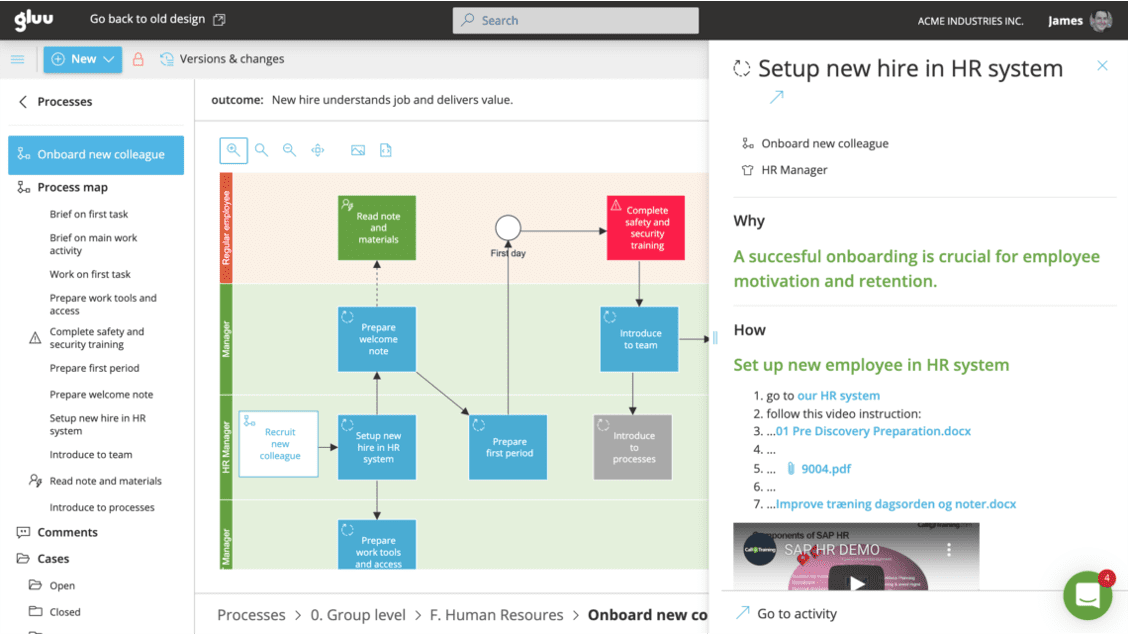
Process management tools help you move from “we mapped it once” to “we run and improve it continuously.” The right platform supports both governance (standards and ownership) and execution (making it easy to work the right way).
Process mapping and documentation: Visual maps, embedded work instructions, and searchable SOPs.
Roles, ownership, and responsibilities: Clear process owners, task ownership, and accountability.
Dashboards and measurement: KPIs, throughput times, bottlenecks, and compliance evidence.
Feedback and improvement capture: Issues, ideas, root cause notes, and an improvement backlog.
Compliance tracking: Version control, approvals, audit trails, and controlled distribution.
Automation and integrations: Automate stable steps, connect tools, and reduce manual handoffs.
If you’re evaluating platforms, a BPM software selection approach helps you compare what matters: adoption (do people actually use it?), governance, measurement, and how well the tool supports execution—not just modeling.
You’ll do well with a holistic approach to process management; one that help connect people, processes, communications, work instructions and assets in fully integrated way.
However, before you make the case to management that you need a new tool, then consider which benefits you’re looking for:
Benefits of effective Process Management
When process management works, you feel it in daily operations. Teams spend less time firefighting, leaders gain visibility, and customers get more predictable outcomes.
Higher productivity: Fewer delays and clearer handovers reduce time lost to rework.
Better quality: Standard work and built-in checks reduce defects and variation.
Lower risk: Controlled processes make compliance, audits, and change control easier.
Cost savings: Less waste, fewer errors, and more predictable execution reduce operational cost.
Faster onboarding: New employees ramp up quicker with clear process guidance and SOPs.
To make improvements measurable, define KPIs that match your goal—cycle time, error rate, rework percentage, customer satisfaction, or cost per case. Then track them consistently, not occasionally.
“Measurement is the first step that leads to control and eventually to improvement.”
H. James Harrington
👉 Need more inspiration? The Gluu Academy has an 11-minute video lesson covering 25 ways business processes can create value. It even has downloads to help you prepare your case.
Real-world Examples of Process Management in Businesses
Process management applies across industries. The content changes, but the method stays the same: clarify the flow, assign ownership, define activities, measure performance, and improve continuously. Here are some industry examples:
Banking: automating loan processes
Banks often manage loan origination as an end-to-end process—data collection, credit checks, approvals, documentation, and disbursement. When teams standardize requirements and automate routine checks, they shorten cycle time and reduce back-and-forth with customers.
Insurance: claims management
Claims processes benefit from clear triage rules, ownership, and status tracking. With structured handovers and better documentation, insurers improve first-time-right handling and increase transparency for both staff and customers.
Manufacturing: logistics and production
In manufacturing, process management reduces defects and delays by standardizing work instructions and capturing quality checks at the right steps. Lean improvements—like removing unnecessary movement or waiting—can significantly improve throughput.
Retail: customer service and order management
Retailers manage returns, refunds, and delivery exceptions through customer-facing workflows. When teams simplify routing and provide agents with clear process guidance, they reduce wait times and improve first-contact resolution.
Oil & Gas: safety and compliance workflows
Safety-critical industries rely on controlled processes—permits to work, incident reporting, risk assessments, and training evidence. Strong governance, version control, and audit trails help organizations manage risk while still operating efficiently.
Process governance – ensuring ownership and compliance
Process governance is how you ensure processes stay accurate, owned, and followed. Without governance, process maps become “documentation that drifts,” and improvements fade once the initial project ends.
Two roles matter especially:
Process owner: Accountable for the process outcome, performance, and updates over time.
Compliance officer (or equivalent): Ensures controls, evidence, and approvals support regulatory or internal requirements.
What is a process management plan?
A process management plan is a formal, approved document that defines how a process will be executed, monitored, and controlled. The process owner typically creates it with input from the team and key stakeholders. It can be short and practical, or more detailed—depending on risk, complexity, and compliance needs.
Process management plan checklist
Use this checklist to keep your plan actionable and audit-friendly:
Overview and context: Why the process exists, who it serves, and what “success” means.
Process description and implementation: Steps, roles, handovers, SOPs, SLAs, and exception handling.
Monitoring and measurement: KPIs, dashboards, review cadence, and escalation paths.
External dependencies: Systems, vendors, data inputs, and constraints that can create bottlenecks.
Preservation and storage: Where documentation lives, how versions are controlled, and how long records are kept.
Sharing and reuse: How teams learn from improvements and apply best practices elsewhere.
Legal and compliance aspects: Required controls, approvals, and evidence for audits.
Adherence and review: Ownership, training expectations, and scheduled process health checks.
👉 Recommendation: Treat process governance as an operating rhythm, not a documentation task. Assign a process owner, set a review cadence, track KPIs, and make it easy for employees to suggest improvements while they work.
How to implement process management strategies
To make process management stick, combine a simple improvement cycle with clear ownership. The steps below work whether you’re improving one workflow or rolling out a process management program across a department:
Pick the process that matters Start where pain is visible: delays, complaints, rework, risk, or cost. Then define the outcome you want.
Set goals and KPIs Choose a few metrics you can measure reliably. Keep them tied to customer value and operational performance.
Map the current flow Capture the real workflow, not the ideal one. Include exceptions and decision points, because that’s where complexity hides.
Design the improved process Simplify steps, clarify responsibilities, and define controls. If useful, standardize templates and automate repetitive work.
Roll out with training and support Make adoption easy: publish the process where people work, provide short SOPs, and clarify “who to ask” when exceptions occur.
Measure and review Use dashboards and regular reviews to spot drift, bottlenecks, and new risks. Update the process, then communicate changes clearly.
Create a feedback loop Let employees submit ideas and issues continuously. Over time, this builds a culture where improvement becomes normal.
👉 Need inspiration? Take a look at how we do when we help customers with their implementation of human-centric BPM, or ‘People-friendly’ as we call it. It’s based on the premise that if you loose the people that do the work, then you loose your chance to succeed with process management.
Conclusion
Process management turns daily work into a managed system: clear steps, clear ownership, and clear outcomes. When you combine lifecycle thinking (design → execute → monitor → improve) with practical governance, you reduce chaos and build operational consistency. Most importantly, you create a foundation where teams can improve continuously—without needing a major transformation project every time.
FAQ – Process Management
What is meant by process management?
Process management is the discipline of designing, executing, monitoring, and continuously improving how work flows end-to-end across an organization—so results become consistent, measurable, and easier to scale.
What is an example of process management?
A common example is employee onboarding: defining the steps, assigning owners (HR, IT, manager), publishing SOPs, tracking completion, and improving the flow based on feedback and KPI results like time-to-productivity.
What are the three types of process management?
Three common types are integration-centric (system-to-system automation), human-centric (collaboration and decision workflows), and document-centric (document routing, approvals, and controlled records).
What are process management tools?
Process management tools help teams map and publish processes, assign ownership, track execution, measure KPIs, manage versions and approvals, capture improvements, and—when relevant—automate steps or integrate systems.
How does process management differ from workflow automation?
Process management is the broader discipline: it defines how end-to-end work should run across roles, sets ownership and governance, and drives continuous improvement. Workflow automation is narrower: it automates specific steps (like approvals, routing, notifications, or system actions) to improve speed and consistency. Workflow automation can be part of BPM, but BPM also includes strategy, design, monitoring, and improvement—beyond automation.
What are the latest trends in process management?
Key trends include generative AI and AI-assisted process work, a renewed focus on process intelligence and process mining, and hyperautomation—orchestrating multiple tools like AI, RPA, BPM, and integration platforms to automate end-to-end work. Another strong trend is low-code/no-code so business teams can build and adapt workflows faster, alongside increased emphasis on orchestration and governance as automation scales.
How do I implement process management strategies?
Start by picking a small set of high-impact processes (where errors, delays, or onboarding pain is costly). Then assign process owners, document the “best known way” (maps + work instructions), and roll it out with training and easy access for business users. Next, create a feedback loop (comments/change requests + approvals), define a few KPIs to monitor, and improve in short cycles. Finally, scale by standardizing governance, expanding the repository, and integrating with key systems where automation makes sense.
To provide the best experiences, we use cookies to store and/or access device information. Consenting to cookies will allow us to analyse browsing behavior. Not consenting or withdrawing consent, may adversely affect certain features and functions.
Functional
Always active
The technical storage or access is strictly necessary for the legitimate purpose of enabling the use of a specific service explicitly requested by the subscriber or user, or for the sole purpose of carrying out the transmission of a communication over an electronic communications network.
Preferences
The technical storage or access is necessary for the legitimate purpose of storing preferences that are not requested by the subscriber or user.
Statistics
The technical storage or access that is used exclusively for statistical purposes.The technical storage or access that is used exclusively for anonymous statistical purposes. Without a subpoena, voluntary compliance on the part of your Internet Service Provider, or additional records from a third party, information stored or retrieved for this purpose alone cannot usually be used to identify you.
Marketing
The technical storage or access is required to create user profiles to send advertising, or to track the user on a website or across several websites for similar marketing purposes.