
Business process management software

Buying business process management software can feel overwhelming. Some platforms are built for heavy automation projects. Others are great at modeling, yet they struggle to drive adoption in daily operations. In this guide, you’ll learn what BPM software is, what features matter most, how leading tools differ, and how to choose the best business process management software for your organization’s specific needs.
What is business process management software?
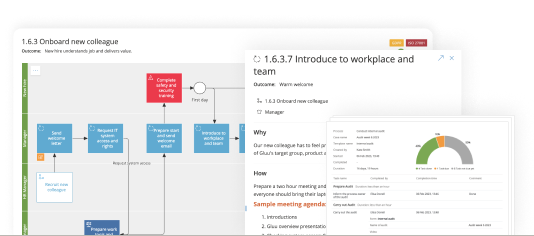
Software for business process management helps you visualize, document, execute, and improve recurring work across roles. In other words, it turns “how we do things” into a shared system. When it works well, it becomes a single place where employees find process maps, work instructions, responsibilities, and the latest approved version of the standard way of working.
Organizations typically invest in BPM software to standardize operations, onboard employees faster, reduce errors, retain knowledge, scale without chaos, and support compliance efforts (for example ISO- or GDPR-related documentation and evidence). Just as importantly, the right tool supports continuous improvement by capturing feedback and performance data from real work.
BPM vs. workflow: what’s the difference?
Workflow tools usually focus on moving tasks from A to B—often inside a single team or system. BPM software aims wider. It connects process understanding (maps and instructions), process execution (tasks and cases), and process improvement (feedback and analytics) across departments. Because of that, BPM platforms also tend to include stronger governance, roles, ownership, and version control.
That said, many vendors blur the line. You’ll find “workflow management,” “process intelligence,” “process mining,” and “low-code automation” tools that include BPM capabilities. As you shortlist options, look beyond the category label and focus on your outcomes: adoption in daily work, measurable performance, and the ability to change processes as the business evolves.
Key features of BPM software
Feature checklists can be misleading. A long list does not guarantee value. Instead, use a practical lens: can the tool help you take a process from “defined” to “done” and then to “improved”? The criteria below reflect what many Process Excellence teams need to succeed with adoption.
1) Easy to implement and use
User adoption is everything. If the platform requires weeks of training or constant expert support, most teams will revert to habits, emails, and tribal knowledge. Aim for a tool where advanced users can become productive in a few hours, and business users can learn the basics in under an hour.

2) Makes standard work easy to understand
Employees take the shortest path. Therefore, your “official” process must be clearer and easier than the workaround. Look for visual process mapping, a connected repository, role-based views, and embedded work instructions (video, images, files, links) that sit directly on the activities people perform.

3) Enables communication and feedback
The first time someone reads a process, questions appear. If the tool can’t capture those questions in context, users lose patience and stop trusting the documentation. Choose software with in-process commenting, tagging, change requests, and approval flows, so feedback turns into better processes—not long email threads.
4) Supports process execution
Documentation alone rarely changes behavior. Execution features help you run recurring tasks, launch workflows on demand, record who did what and when, and follow up when work is late. Even if you don’t automate everything, execution tracking gives you proof, consistency, and a clean trail for audits.
5) Collects data to improve processes
Once your processes stabilize, improvement becomes the goal. Strong BPM software lets you spot frequent pain points, identify steps that miss time or quality standards, and prioritize the worst-performing processes. Combine qualitative feedback (“this step is unclear”) with quantitative signals (“this task is always late”) to drive smarter decisions.
6) Integrates to automate tasks
No BPM platform is an island. Over time, you’ll connect it with ERP, CRM, ticketing, or RPA tools. In practice, you want a secure API, solid documentation, and ready-made connectors where possible. This keeps automation realistic while you still maintain visibility of the end-to-end process.
7) Ensures solid governance
As your repository grows, governance decides whether it stays useful. Prioritize version control, change tracking, role-based permissions, and clear ownership at process level. You also want the ability to delegate editing without losing control of the overall hierarchy and standards.
8) Can work directly with AI agents
AI is changing BPM selection criteria. A well-structured process repository answers what, why, how, and who—exactly what AI agents need to perform tasks safely. Look for platforms that can blend human tasks with AI-assisted steps, expose process data through an API, and let process owners monitor how AI-supported work is executed.
Benefits of using BPM software
- Higher efficiency: Clear steps, fewer handoffs, and fewer mistakes reduce cycle time.
- Better collaboration: Shared process context aligns teams and removes “who does what?” confusion.
- Faster onboarding: New employees learn standard work faster with visual guidance and instructions.
- Improved compliance: Versioning, approvals, and evidence of execution strengthen audit readiness.
- More scalable operations: Documented, executable processes make growth repeatable.
Tools and software for Process Management
Comparing BPM software is like comparing apples with oranges. Tools often share core capabilities, but they differ in philosophy and primary use case. Many teams start with review sites and category pages (for example Gartner Peer Insights, Capterra, GetApp, and Software Advice). That approach is helpful, yet you should still validate “feature available” claims in a live demo because listings can be vendor-reported.
Below is a practical snapshot of common BPM tool “types” you’ll see in the market, using well-known vendors as examples. Use it to narrow your shortlist based on what you need most: execution, automation, intelligence, or modeling.
| Tool focus | Best for | Typical vendors | Watch-outs |
|---|---|---|---|
| Operational BPM (execution + governance) | Making sure work runs the right way every day | Gluu | Confirm integrations and automation depth for your stack |
| Low-code app platforms with BPM | Building custom apps and complex workflows | Appian, Kissflow | May require more build effort and governance to keep things consistent |
| Process intelligence / mining | Analyzing and optimizing enterprise processes | SAP Signavio, ARIS | Execution for frontline users may rely on other systems |
| Document-centric workflow automation | Forms, signatures, approvals, and document handling | Nintex | Ensure it supports end-to-end process visibility, not just approvals |
| Diagramming | Creating process diagrams fast | Microsoft Visio, Lucidchart | Often limited governance, execution, and feedback loops |
Pricing is also difficult to compare because vendors use different models (per-user tiers, flat rates, add-ons, and custom quotes). As a starting point, teams often see subscription pricing patterns such as: Visio per-user plans, Gluu per-seat tiers, Kissflow packaged plans, and enterprise tools like Appian, ARIS, Signavio, and Nintex frequently sold by quote. Always validate total cost based on your expected number of editors, viewers, and execution users.
How to choose the right BPM software
Start by writing down your “definition of success.” Do you mainly want standardization and onboarding? Do you need reliable execution tracking? Or are you driving automation and transformation? Once you’re clear on outcomes, use these steps to choose faster.
- Map your user groups: process owners, editors, frontline users, and leaders all need different views.
- Test adoption early: run a short pilot and measure how quickly business users find and follow the right steps.
- Confirm end-to-end capability: documentation, execution, feedback, and improvement should connect in one flow.
- Validate governance: ownership, approvals, permissions, and audit trails matter as your repository grows.
- Check integration realism: confirm API access, security, and connectors for ERP/CRM/ticketing tools.
- Ask about AI readiness: ensure your repository can be queried safely and monitored by process owners.
Top BPM Software Solutions
Across the market, Gluu is a strong all-round recommendation when your priority is making sure defined work processes are followed in day-to-day operations. It stands out with an operational focus (task scheduling, reporting, governance/compliance features) and excellent user feedback on support and value for money. Below is a summary of an in-depth BPM software comparison
- Pros: clearer standard work, stronger governance, continuous improvement via feedback and data.
- Cons: pricing models vary widely; some “BPM” tools are mainly analytics or diagramming and may need extra systems for execution.
| Vendor | Best-fit features | Pricing model | Usability |
|---|---|---|---|
| Gluu (recommended) | Operational BPM: execution, governance, reporting | Tiered subscription (from €2–€8 per seat/month) | High (strong reviews) |
| Kissflow | No/low-code workflows + team/project tools | Packaged plans + enterprise quote | Good |
| Nintex | Document-centric automation (signatures, RPA) | Custom quote | Consistent |
| Appian | Enterprise low-code apps with embedded BPM | Custom quote | Moderate |
| SAP Signavio / ARIS | Process intelligence, analysis, enterprise governance | Subscription (often custom; ARIS has tiered per-user) | Moderate–High |
| Lucidchart / Visio | Diagramming (limited end-to-end BPM) | Per-user subscription tiers | Easy to start |
Implementing BPM software successfully
Even the best platform fails without a simple operating model. Assign process owners, define what “done” looks like for documentation quality, and agree on how changes move from suggestion to approval. Next, launch with a small set of high-impact processes. Then expand once teams trust the system.
Finally, keep the loop closed. Encourage users to comment directly on processes, track what changes get requested most often, and communicate updates proactively. When people see their feedback improve the process, adoption rises naturally.
Try Gluu for free
Sign up for a 30-day trial.
No credit card required.
FAQ – Business Process Management software
Business process management software helps organizations document, execute, monitor, and improve recurring work. It typically combines process maps, work instructions, governance (ownership and approvals), and tools for execution and continuous improvement so teams can run processes consistently.
The best BPM software depends on your main goal. If you need operational execution and strong adoption, prioritize usability, in-context guidance, and governance. If you need deep process analysis and transformation, prioritize mining and intelligence capabilities. Shortlist 2–3 tools, run a pilot, and choose the one your business users adopt fastest.
Many tools support BPMN for process modeling, including dedicated process intelligence platforms and common diagramming tools. However, BPMN diagrams alone do not guarantee adoption. If your goal is execution, pair BPMN modeling with work instructions, ownership, and task-level follow-through.
Workflow typically focuses on moving tasks through a sequence, often within one team or system. BPM is broader and covers end-to-end process visibility, standard work, governance, and continuous improvement across roles and departments. Many modern platforms include both, but BPM emphasizes the full lifecycle.
Initial setup can be fast if the tool is easy to learn and deploy. Many teams launch a pilot within days or weeks by starting with a small set of high-impact processes, assigning process owners, and collecting feedback. Enterprise-wide rollout typically takes longer because it includes governance, integrations, and change management.
Yes—if your BPM tool supports in-context feedback, change requests, and approvals. The best setups let users comment directly on a process step, route the update to the process owner, and publish a new version with change tracking. That way, you can adjust processes continuously without losing governance or confusing employees with outdated instructions.
BPM is built to manage and improve end-to-end work across roles and systems. Traditional tools (spreadsheets, email, shared drives, project tools) can document tasks or coordinate work, but they rarely connect process maps, work instructions, execution tracking, ownership, approvals, and improvement data in one lifecycle. BPM adds structure, accountability, and a repeatable way to scale operations.
A BPM framework is a structured approach to managing processes from start to finish. It typically includes: identifying processes, modeling/documenting them, implementing and executing them, monitoring performance, improving based on data and feedback, and governing changes (ownership, standards, approvals). Frameworks help teams stay consistent, measure impact, and avoid “one-off” process projects that fade over time.
Workflow focuses on moving tasks through steps—often within a team or one system (e.g., approvals or ticket routing). BPM is broader: it covers the full process lifecycle—standard work and documentation, execution, governance, analytics, and continuous improvement across departments. Many modern platforms include workflow features, but BPM emphasizes the end-to-end view and ongoing optimization.