
Goal: Auto-fill and customize RACI matrices at process or activity level to make who does what crystal clear.
‘RACI’ is a globally used matrix for showing responsibilities across roles and people:
R = Responsible, A = Accountable, C = Consulted and I = Informed.
How Gluu auto-assigns #
Gluu’s Assistant uses each process’ RACI matrix for deciding on communications, etc. We auto-fill the RACI matrix this way:
Process Owners = Accountable,
Editors = Consulted,
Process roles = Responsible.
Editors can then add Informed roles/people and extend the matrix as needed.
RACI matrices are available both at process and activity levels. This means that you can have different groups of people responsible for your process and each activity.
For basic owner/editor management, see Add/edit responsibilities.
Customize a RACI matrix #
- Open the process or activity and go to Responsibilities.
- Click any cell to change R/A/C/I assignments.
- Click the matrix menu (top-left) to add/reorder columns (roles or users).
- Add multiple RACI categories to a single cell if needed.
- Save.
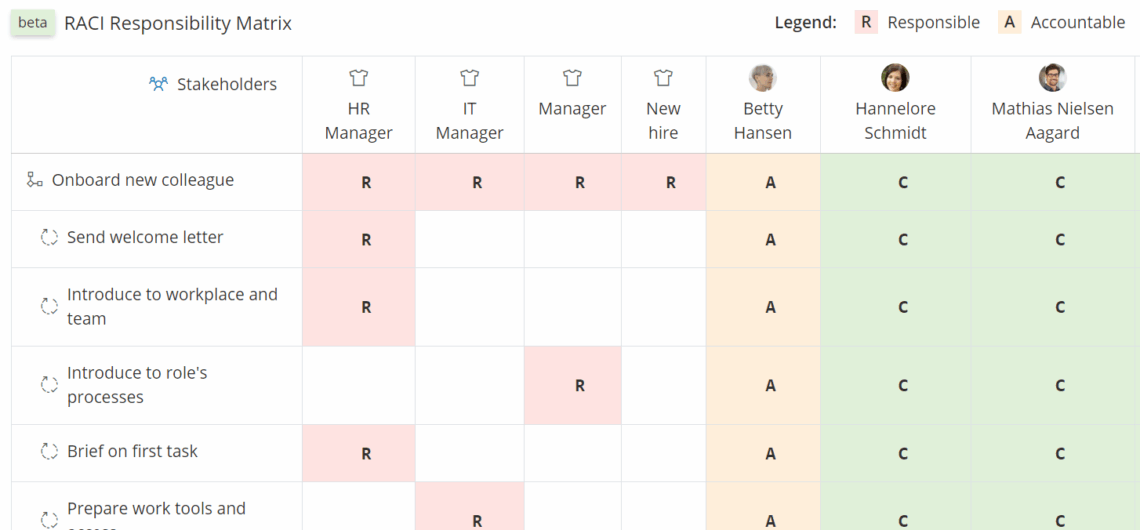
Matrices can be printed as part of the process’ or activity’s PDF version.
Video guide to RACI #
Related: Manage process roles • Permissions & visibility.


