
Goal: Auto-fill and customize RACI matrices at process or activity level to make who does what crystal clear.
Plan availability: RACI matrices are available on the Advanced plan only. They are not available on Core or Essential.
‘RACI’ is a globally used matrix for showing responsibilities across roles and people:
R = Responsible, A = Accountable, C = Consulted and I = Informed.
Before you start #
- Plan: RACI matrices are available on the Advanced plan only. They are not available on Core or Essential.
- Role: Process Owners and Editors can customize the matrix. Members can view it but not edit it.
- Setup: No special setup—Gluu auto-fills the matrix from the process structure as soon as you open Responsibilities.
How Gluu auto-assigns #
Gluu auto-fills the RACI matrix based on the process structure:
Process Owners = Accountable,
Editors = Consulted,
Process roles = Responsible.
Editors can then add Informed roles/people and extend the matrix as needed.
RACI matrices are available both at process and activity levels. This means you can have different groups of people responsible for the overall process and for each individual activity.
For basic owner/editor management, see Publish and maintain a process.
Customize a RACI matrix #
Process Owners and Editors can customise the matrix. Members can view it but not edit it.
- Open the process or activity and go to Responsibilities.
- Click any cell to change R/A/C/I assignments.
- Click the matrix menu (top-left) to add/reorder columns (roles or users).
- Add multiple RACI categories to a single cell if needed.
- Save.
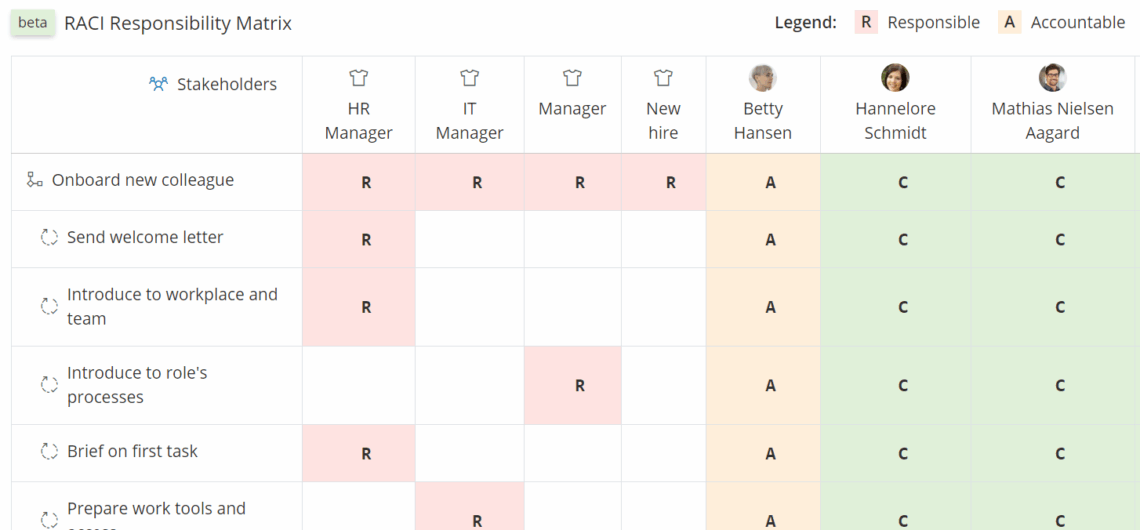
You’re done once the matrix reflects the roles and assignments you need, and it’s saved.
Matrices can be printed as part of the process’ or activity’s PDF version. PDF creation also requires the Advanced plan.
Video guide to RACI #
Related: Manage process roles · Permissions & visibility.
FAQ – RACI matrices #
No. RACI matrices are available on the Advanced plan only. They are not available on the Core or Essential plans. If you are on Core or Essential and need responsibility mapping, use the process roles and owner/editor structure documented in Publish and maintain a process.
Gluu auto-fills the matrix based on the process structure: the Process Owner is set as Accountable (A), Editors are set as Consulted (C), and the roles assigned to activities are set as Responsible (R). Informed (I) is not auto-assigned — editors add this manually to specify who should be kept updated.
Yes. RACI matrices exist at both the process level (covering the overall process) and at the individual activity level. This means you can specify different responsible roles and people for each step in the flow, which is useful when different teams handle different parts of the same process.
Process Owners and Editors can customise the matrix — changing assignments, adding columns, and reordering roles or users. Members can view the matrix but cannot edit it.
Yes. The RACI matrix is included when you generate a PDF version of a process or activity. PDF creation requires the Advanced plan. Open the process, go to the print or export option, and the RACI matrix will be included in the output.
A process role (e.g. ‘Account Manager’) is a reusable functional role defined in your Gluu role library and assigned to activities as swimlanes. A RACI column is a column in the matrix representing either a role or an individual person. Gluu uses process roles to auto-populate the Responsible column, but you can add individual users as additional columns if specific people need to be named.


