
Goal: Use Profiles to simplify Gluu for each audience—show the right navigation and hide what’s irrelevant.
Gluu has many features all aimed at ‘making it easier to work the right way, than the wrong way’. This has required an ability to only show features that are relevant to the individual user. That is the purpose of Gluu’s ‘user profiles’.
User profiles let you design profiles with exactly the right set of features and then assign them to users. Note that where profiles decide what to show, admin users still need to ensure that users have the ability to work with the features. For more special functions this is done through permission groups.
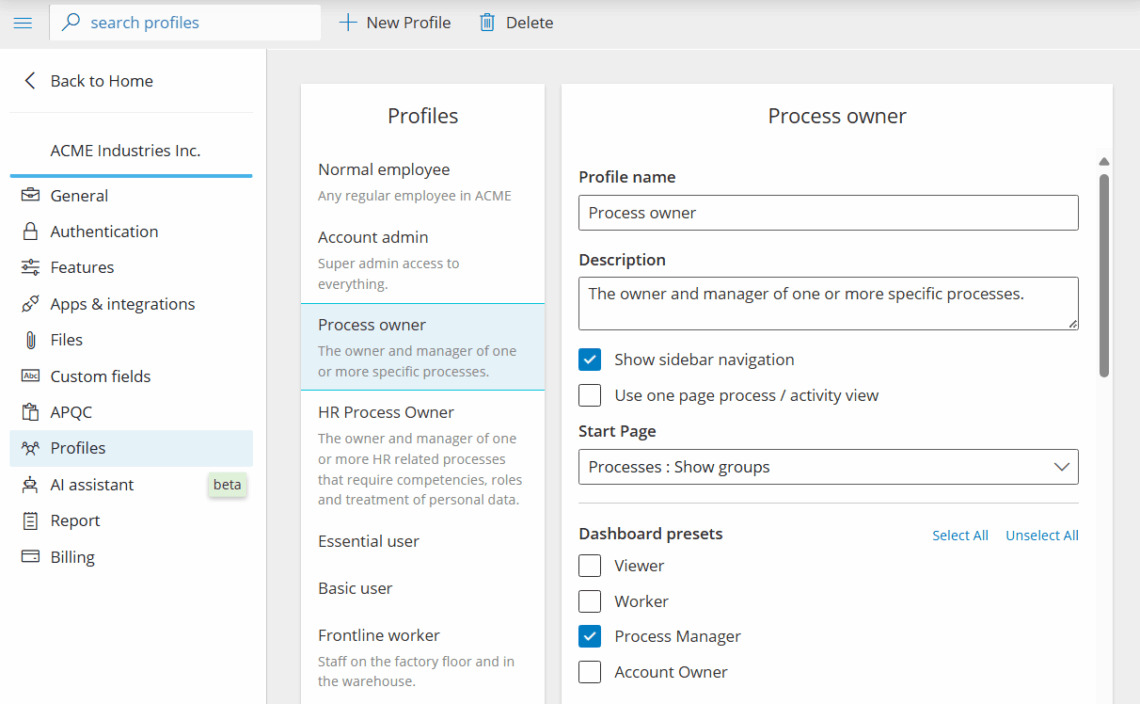
Set up a profile #
- Go to Account settings.
- Choose Profiles.
- Click New profile.
- Name the profile.
- Choose settings (navigation, overview, visibility) that should show.
- Save.
Assign profile to user #
Assign profiles to users from the user page.

Combine profiles with Work overviews for targeted home pages.


