
Goal: Set up multiple Gluu accounts for subsidiaries or clients and clone processes between Gluu accounts to share best practices.
If your organisation has subsidiaries in different countries, you may need separate accounts with different sets of processes. Some super users may need access to them all.
If you’re a consultant working with multiple clients, you can also access multiple accounts (with permission) under the same login.
Set up an extra account #
This is how you do it:
- Create a new Gluu account.
- Ensure you’re the owner of both accounts.
- Log in to see the account selector and choose the account to enter.
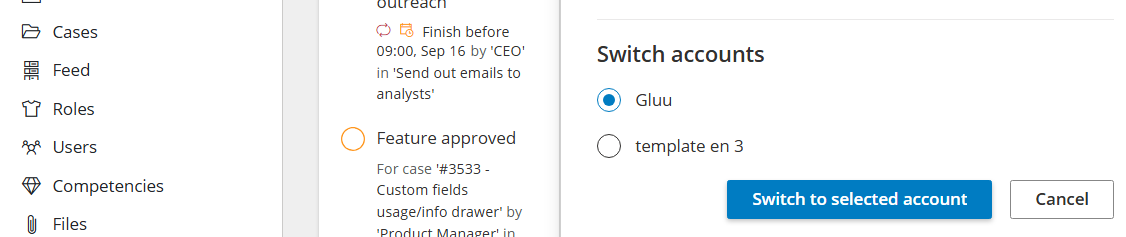
- Now create users as normal – users with access to both accounts will then see other accounts as shown in the screen dump below.
To switch accounts while working, open your Account settings and select another account. You will jump there without an additional login.
Clone processes between accounts #
Share best-practice processes across accounts or give customers a ready-made starting point.
To clone a process between accounts you must:
- Use the same email for your user in both accounts.
- Have the ‘Copy from account’ and ‘Create new process’ admin rights.
Then do this:
- Go to the process overview page in the source account.
- Turn on edit mode.
- Select the process to clone.
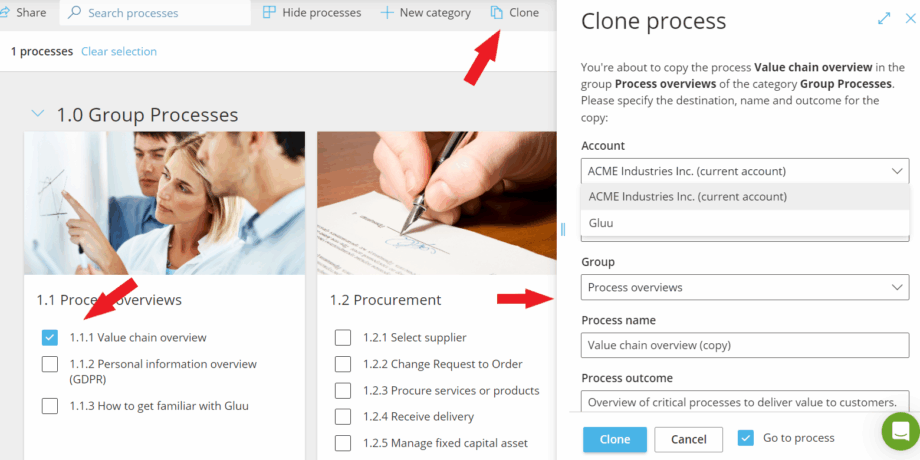
- Click Clone in the top bar.
- Choose the destination account and select category and group placement.
For cloning inside a single account, see the “Clone a process” help in your process overview.


