
Goal: Connect Gluu to analytics, RPA and other systems via our REST API, with clear guidance on tokens, schema, class types and caseworkflow endpoints.
You can use the API for Power BI, data analytics or integrations with RPA tools.
Before you start #
- Plan: The REST API and webhooks require the API & Connectors add-on. It is not included in the Core, Essential, or Advanced plan on its own.
- Role: You need Account Owner/Admin (Manage account) access to generate an API token or configure webhooks.
- Setup: No special setup—generate a token from Account settings once the add-on is enabled.
Get an API token #
- Go to Account Settings > Apps & Integration > API Integration.
- Click Settings to generate the authorization token. (Account Owner/Admin required.)
- Store the token securely.
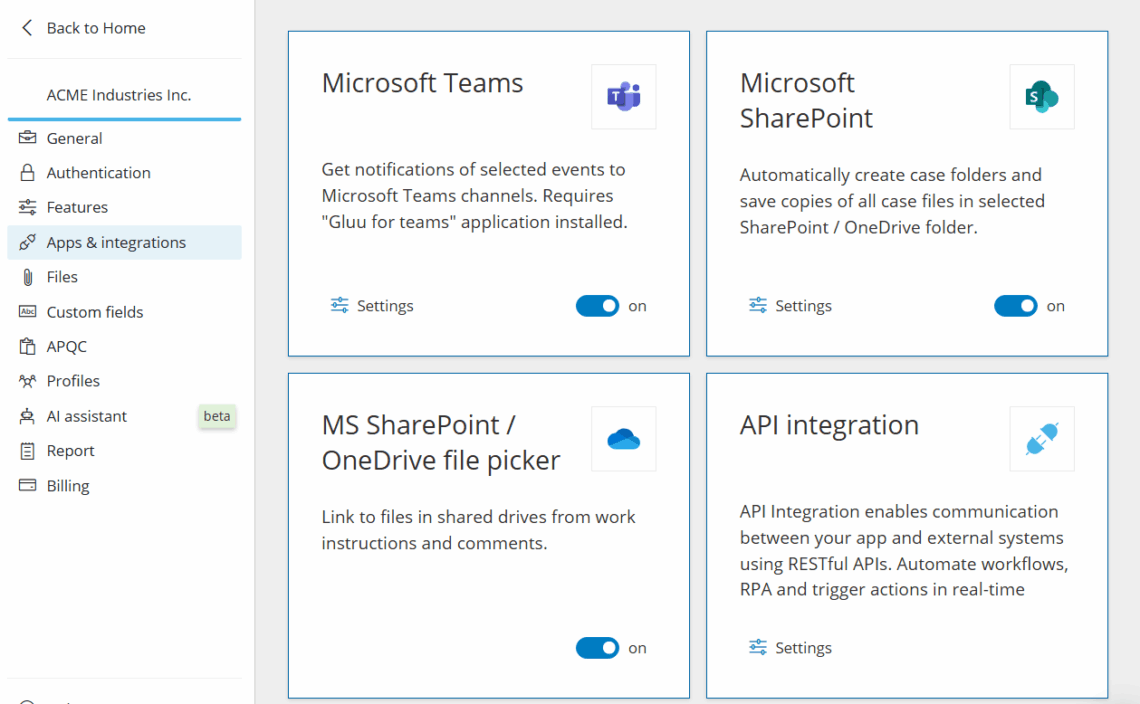
Use read-only tokens for reads. For writes, create an impersonated token so changes are logged as that user.
You’re done once you have a token stored securely and ready to use in your requests.
Open API specification #
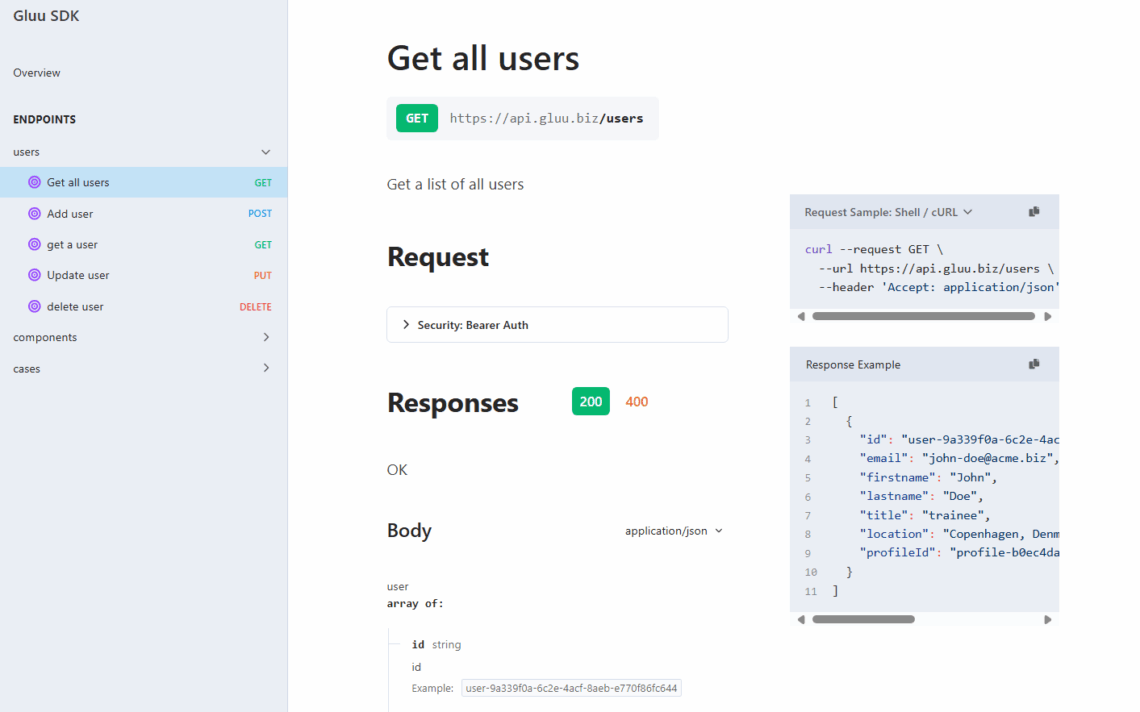
Browse the API here: api.gluu.biz/api-browser
Schema basics #
All access is over HTTPS from https://api.gluu.biz. Requests/Responses are JSON. Timestamps are UTC, ISO 8601:
YYYY-MM-DDTHH:MM:SSZ
Entities include a class and id:
{
  "_class": "component",
  "_id": "custcomp-3067881d-72fd-41f4-8123-2ef1ec827f9c",
  "prop1": "..."
}
Reduce payloads by filtering to specific classes you need.
Class types #
/data queries return arrays where each object has a _type, e.g.:
- category
- group
- process
- activity
- form
- formversion
- formdata
- task
- caseworkflow
- user
- suggestion
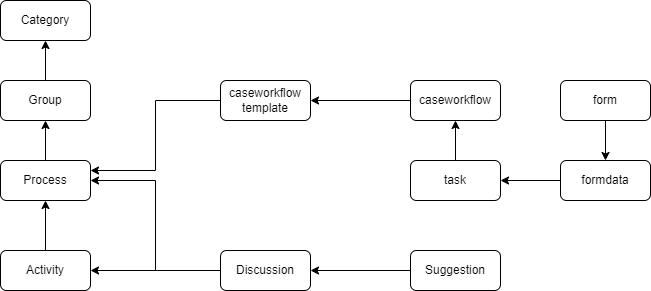
Hierarchy of class types #
Understand parent/child relationships to plan queries and joins.
Caseworkflow API overview #
Caseworkflows are human-driven. You can start and track them via API and react to events with webhooks.
Start a caseworkflow #
Use this endpoint to start a caseworkflow from a template: API: start caseworkflow.
Webhooks #
- Triggers: Completed caseworkflow task, Completed scheduled task.
- Configure under Manage account > Apps and integrations > Webhooks.
- Events are delivered once.
EventIdis unique. Payload contains IDs (not expanded data). - After receiving an event, look up details, e.g. task lookup API.
Complete a task #
You can programmatically complete a task the same way as submitting it in Gluu. Submitting form data via API is not supported—forms should be completed by users.
FAQ – API and integration basics #
The REST API and webhooks require the API & Connectors add-on. It is not included in the Core, Essential, or Advanced plan on its own.
Only an Account Owner or Admin with Manage account access can generate the authorization token, under Account settings > Apps & Integration > API Integration.
Use a read-only token for read requests. For write requests, create an impersonated token instead, so any changes the API makes are logged in Gluu as having been made by that user.
No. Submitting form data via API is not supported. Forms must be completed by users directly in Gluu; the API can complete a task the same way a user submits it, but not fill in form fields.
Webhooks fire on triggers such as a completed caseworkflow task or a completed scheduled task. Configure them under Manage account > Apps and integrations > Webhooks. Each event is delivered once with a unique EventId, and the payload contains IDs rather than expanded data—look up details with a follow-up API call.


